
- Published on
- · 14 min read
JVM Architecture & Class Loading — Understanding Java Fundamentals
4 parts
- Authors

- Name
- Nguyễn Tạ Minh Trung
Table of Contents
📚 JVM Fundamentals Series
Overview
In the Java ecosystem, understanding the JVM and the Java Memory Model (JMM) not only helps you write correct code — it also unlocks a deep understanding of how Java operates at its core. The JVM is not a "black box": it manages memory, loads classes, executes bytecode, and optimizes performance through the Interpreter, JIT Compiler, and Garbage Collector.
The JMM ensures memory consistency and visibility across threads, enabling Java to avoid race conditions and other subtle concurrency bugs.
In this article, you will explore the JVM architecture in detail, focusing specifically on how the JVM loads and manages classes. This foundation will help you understand application performance, optimize systems, and debug class loading issues more effectively.

To truly understand what the JVM does, you need to view it not as a "black box that runs Java," but as a component-based runtime system consisting of three core parts:
- Class Loader System ← Focus of this article
- Runtime Data Areas (Heap, Stack, Meta/Perm)
- Execution Engine (Interpreter + JIT Compiler)
Class Loader Subsystem
What's Class Loader Subsystem?
The Class Loader Subsystem is the mechanism that allows the JVM to load classes into memory on demand. It is the core enabler of Java's flexibility, dynamic loading, and hot deployment capabilities.
When a class is used by the JVM, it cannot execute a .class file directly from disk and must first load it into memory for the following reasons:
The VM needs a structured, in-memory representation of the class in order to execute it. A
.classfile is a binary artifact in the ClassFile format, which must be transformed by the JVM into internal runtime structures, including:- class metadata (class name, superclass, implemented interfaces, etc.)
- a parsed constant pool (the list of fields and methods)
- bytecode for each method
- access flags information
- runtime metadata required for reflection
- memory layouts used for object allocation on the heap
Execution performance: if the JVM had to read the class file from disk every time a method was invoked, performance would collapse. Once loaded into the JVM, classes can be:
- cached in the Method Area / Metaspace
- optimized by the JIT compiler
- immediately accessed by reflection APIs
- used by the GC to manage objects instantiated from the class
- allowed to invoke methods on each other without repeated disk access
Support for runtime features such as:
- Reflection
- Dynamic proxies
- JIT compilation
- Annotations
- Class redefinition (hot swap during debugging)
- CDI / Spring DI (class scanning and metadata loading)
For the reasons and features outlined above, classes are required to reside in memory so that the JVM and frameworks can read and operate on their metadata.
So why does the JVM load classes on demand instead of loading all classes upfront and then simply using them?
The JVM uses a lazy loading (load-on-demand) model to optimize resource usage and application startup time. This design exists for three major reasons:
Memory optimization — avoiding unnecessary RAM consumption Java applications may contain:
- thousands of classes
- hundreds of JAR files
- large frameworks such as Spring Boot and Hibernate
In practice, not all classes in a Java application are actually used at runtime. The JVM loads a class only when it is needed, for example:
- when creating a new object instance
- when invoking a static method
- when accessing a field
- during reflective lookups
- when the JIT Compiler optimizes execution paths
If all framework classes and JARs were loaded into the JVM during startup, your RAM would become like an overfilled warehouse—bloated and storing everything at once. In that case, the following issues would occur:
- Metaspace would grow unnecessarily
- Startup time would increase significantly
- Both memory and CPU resources would be wasted
Optimizing Startup Time
Imagine if the JVM had to load 30,000 classes when starting a Spring Boot application—the startup time would increase dramatically. Lazy loading helps by:
- starting the JVM very quickly
- loading only the classes required for initial execution
- avoiding unnecessary loading of rarely used classes
Example: You may have 100 REST endpoints, but if users only invoke 10 of them today, the JVM only needs to load the classes related to those 10 endpoints.
Dynamic Loading
Java was designed to run large, distributed, and modular applications where systems must evolve and scale without stopping the application:
loading plugins at runtime (runtime extensibility)
- You can add new features simply by dropping a JAR file into a plugin directory, no rebuild required, no application restart.
- Example: Tools like IntelliJ IDEA and Jenkins load plugins through dynamic class loading.
Swapping implementations via interfaces without restarting You can:
- switch database drivers
- change email service providers
- replace the template engine
... and the application continues to run normally, because the JVM loads an implementation only when the corresponding class is actually used.
At this point, a common question arises: why does Spring Boot require a restart when changing database configuration, email providers, or beans? This behavior depends on how the Spring Framework operates, not on the JVM itself:
App → ClassLoader → Load classpath → Run- When you change a driver or switch an implementation, the new class does not exist on the old classpath.
- There is no way to unload the old class (the JVM intentionally forbids this).
- Spring does not create a new classloader for the entire application (except in devtools). → Restarting is the simplest and safest approach.
Hot Deploy / Hot Swap
- Many platforms support hot deploy and hot swap, such as:
- Spring DevTools
- JRebel
- Java Instrumentation API
These platforms rely entirely on the JVM's ability to load new classes to replace existing ones while the application is running.
Module Systems: OSGi, Java Platform Module System (JPMS) OSGi introduces a layered classloader model, where each bundle has its own classloader, enabling modules to:
- be loaded and unloaded independently
- be upgraded at runtime (hot upgrades)
- avoid dependency conflicts (class shadowing / class hiding)
Loading Classes from the Network — Java's Original Philosophy (Applets) Historically, Java Applets allowed the JVM to download classes from the internet and execute them immediately in the browser. Dynamic loading remains the foundational mechanism behind this capability.
A Practical Example: Spring Boot Spring Boot relies almost entirely on dynamic class loading:
- loading beans when they are referenced or when the application context is initialized
- loading configurations based on profiles or conditions (@Conditional)
- loading dependency modules according to the runtime environment
- loading classes from external libraries (external JARs) through multiple classloaders
If Spring Boot were forced to load all classes upfront:
- startup time would be disastrous
- memory usage would spike
- hot reload and conditional loading would no longer be possible
Goals of the Class Loader:
Load
.classfiles containing bytecode into the JVM and transform them into Class objects in the heap.- The Class Loader reads
.classfiles (or byte streams from JARs, the network, or custom sources) and converts them into in-memory Class objects used during execution.
- The Class Loader reads
Building the dependency graph When a class is loaded, the JVM automatically loads:
- its superclass
- implemented interfaces
- field types
- method parameter and return types → forming a dependency graph between classes.
Isolating namespaces between modules Each class loader has its own namespace → two classes with the same fully qualified name but loaded by different class loaders are treated as distinct classes. This enables:
- application isolation (separate Tomcat web applications)
- plugin architectures (OSGi)
- reloading classes without affecting other applications
Supporting sandboxing and security by controlling class origins The Class Loader controls:
- where a class is loaded from (file system, network, custom source)
- whether loading the class is permitted → ensuring the JVM's security boundaries.
Enabling custom class loaders (OSGi, Spring Boot, application servers like Tomcat/JBoss) Developers can implement custom Class Loaders to:
- load classes from a database
- dynamically generate classes (ByteBuddy, ASM)
- support hot reload (Spring Boot DevTools, Tomcat)
- manage modules (OSGi)
Class Loader types:
- Bootstrap ClassLoader
- Extension/Platform ClassLoader
- Application ClassLoader
Operating Principles:
The JVM starts → the Bootstrap Class Loader is implicitly initialized in native code.
It locates and loads the core JRE classes from rt.jar or the Java Runtime Image.
When another class needs to be loaded (for example,
java.sql.Connection), the JVM first delegates the request to the bootstrap loader. If the class is not found, it then delegates to child class loaders (extension, application, custom). This follows the Parent-First delegation model, ensuring that core JVM classes cannot be overridden or modified by other class loaders.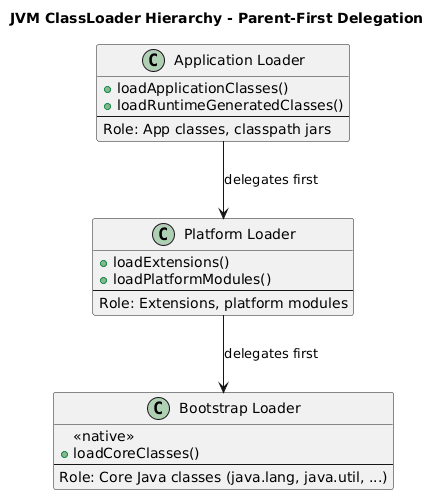
Bootstrap Class Loader
In the JVM architecture, the Bootstrap Class Loader (also known as the Primordial Class Loader) is the most fundamental and highest-level class loader, serving as the foundation for JVM startup. It is the very first "building block" that establishes the Java runtime environment, because nothing in the JVM can function until the core classes are loaded.
The Bootstrap Class Loader is responsible for loading Java's core classes—specifically, the classes essential for JVM operation:
java.lang.Object— the root class of all objects in Javajava.lang.String— the core class for string handling- Classes in packages such as
java.lang,java.util,java.io, and others that are part of the Java Runtime Environment (JRE)
In other words, every other class loader and every other class ultimately depends on the classes loaded first by the Bootstrap Class Loader.
Key characteristics:
| Feature | Explanation |
|---|---|
| Native code implementation | The Bootstrap Class Loader is implemented in native code (typically C/C++), not in Java, because the JVM requires it to exist before any Java classes are loaded. |
| No parent class loader | It is the root of all class loaders and has no parent. Other class loaders in the JVM follow the parent delegation model, but the bootstrap loader sits at the very top. |
| Location of loaded classes | Java ≤ 8: loads classes from rt.jar located in <JAVA_HOME>/jre/lib. Java ≥ 9: uses the Java Runtime Image (JRT) through the module system rather than a java.lang.ClassLoader instance. As a result, it is not possible to obtain a reference to the bootstrap class loader via the ClassLoader API. |
So why is the Bootstrap Class Loader so important?
- It establishes the foundation for JVM execution: every other class loader depends on it.
- It ensures safety: core classes (
java.lang.*) cannot be overridden because the bootstrap loader sits at the top of the hierarchy. - It initializes the runtime environment: the heap, stack, code cache, GC, JIT, and other runtime components all rely on the core classes loaded by the bootstrap loader.
- It supports the module system (Java 9+): core classes are managed as modules, making the JVM more lightweight, better isolated, and more secure.
Extension/Platform ClassLoader
In the Java ClassLoader hierarchy, after the Bootstrap Class Loader, the next level is the Extension Class Loader (called the Platform Class Loader in Java 9+). This is an important component responsible for loading extension libraries and platform modules that extend the functionality of core Java.
Before Java 9, extensions were loaded from the Java extension directories ($JAVA_HOME/jre/lib/ext). These classes typically included:
- JDBC drivers
- security providers
- other standard extension libraries
From Java 9 onward, this class loader was renamed to the Platform ClassLoader. It is responsible for loading platform modules and is a core component of the Java Platform Module System (JPMS). Key considerations when working with the Extension / Platform ClassLoader
- Precedence & versioning: Classes loaded by the Extension/Platform ClassLoader have higher precedence than those loaded by the Application ClassLoader. As a result, if the same class exists both in the extension/platform layer and on the application classpath, improper management can lead to version conflicts, because the JVM will resolve and use the version loaded by the Extension/Platform ClassLoader.
- Security implications: Because the Platform ClassLoader sits above the Application ClassLoader in the hierarchy, the JVM treats these classes as trusted libraries. They may also be granted higher privileges than application-level classes. Therefore, when deploying applications, it is critical to ensure that untrusted classes do not end up in extension/platform locations and that access permissions for classes loaded by the Platform ClassLoader are properly controlled.
Application Class Loader
In the Java ClassLoader hierarchy, the Application ClassLoader (also known as the System ClassLoader) is the last loader in the parent delegation model. It is responsible for loading application classes and external libraries, and it is the class loader that developers most commonly interact with when running projects or working with the classpath.
This loader loads application code, including:
Classes loaded from the classpath: – code written by you – external libraries (JARs, directories)
Locations defined via: – the CLASSPATH environment variable – command-line options: -cp or -classpath
The Application ClassLoader also supports dynamic class loading through techniques such as:
- Reflection:
Class.forName("com.example.MyClass") - Proxy classes or bytecode generation: Spring AOP, Hibernate, ByteBuddy
These classes are loaded into the JVM Method Area / Metaspace; object instances are allocated on the Heap, and stack frames are created on thread stacks when methods are invoked.
As the final loader in the parent delegation model, the Application ClassLoader can see classes loaded by its parents, but its own classes are not visible to parent loaders. This ensures that core classes and platform modules cannot be overridden, while still allowing applications to load the classes they need without affecting the JVM.
Example:
java -cp myapp.jar com.example.Main
- The JVM uses the Application ClassLoader to locate myapp.jar on the classpath.
- It loads com.example.Main and its dependent classes from the JAR.
- If a class cannot be found in the parent class loaders or on the classpath, a ClassNotFoundException is thrown.
Conclusion
Understanding the JVM Class Loader Subsystem is fundamental to mastering Java's architecture. In this article, we've explored:
- Why lazy loading matters: The JVM optimizes memory and startup time by loading classes only when needed, enabling dynamic features like plugins, hot swap, and modular architectures.
- The three-tier hierarchy: Bootstrap, Extension/Platform, and Application ClassLoaders work together using parent-first delegation to ensure core classes remain secure while allowing application flexibility.
- Real-world impact: Frameworks like Spring Boot, OSGi, and application servers all rely on dynamic class loading to provide the modularity and extensibility that make Java powerful for enterprise applications.
Now that you understand how the JVM loads and manages classes, you're ready to explore where those classes and objects live in memory. In the next article, we'll dive deep into the JVM's Runtime Data Areas, including the Heap, Stack, Metaspace, and how memory is structured to support efficient execution and garbage collection.
📚 Continue Learning
Next in Series: JVM Memory Management — Heap, Stack, and Runtime Data Areas
Learn how the JVM organizes memory, manages object lifecycles, and optimizes performance through sophisticated memory architecture.
Other Articles in This Series:
This article is part of the JVM Fundamentals Series. Each post builds on the previous one to give you a comprehensive understanding of how Java applications run under the hood.