
- Published on
- · 17 min read
JVM Memory Management — Heap, Stack, and Runtime Data Areas
4 parts
- Authors

- Name
- Nguyễn Tạ Minh Trung
Table of Contents
📚 JVM Fundamentals Series
Introduction
In the previous article, we explored how the JVM loads and manages classes through the Class Loader Subsystem. We learned about the Bootstrap, Platform, and Application ClassLoaders, and how lazy loading enables Java's dynamic flexibility.
But once classes are loaded, where do they live in memory? And when you create objects, invoke methods, or manage threads—where does all that data go?
This is where the JVM's Runtime Data Areas come into play. These memory regions are carefully designed to:
- Separate shared memory (accessible by all threads) from thread-local memory
- Support efficient bytecode execution
- Enable automatic garbage collection
- Ensure memory safety across concurrent operations
Understanding these memory areas is crucial for:
- Performance optimization: Know where objects are allocated and how GC impacts your application
- Debugging memory issues: Diagnose OutOfMemoryErrors, memory leaks, and GC pauses
- Thread safety: Understand which memory regions require synchronization
- Application design: Make informed decisions about object lifecycles and caching strategies
In this article, you'll master the JVM's memory architecture, from the Heap's generational design to Stack frames, Metaspace, and the per-thread memory areas that enable concurrent execution.
Runtime Data Area
What is Runtime Data Area?
Runtime Data Areas are the set of memory regions created and managed by the JVM throughout the entire lifecycle of an application.
The Java Virtual Machine (JVM) divides memory into separate areas to classify memory spaces based on their intended usage. The core idea is to quickly identify the approximate usage pattern of a given object and to focus only on objects of specific interest.
These data areas are carefully designed to ensure:
- Isolation between threads
- Efficient bytecode execution performance
- Memory safety
- Optimized garbage collection (GC)
- Cross-platform support (through an underlying abstraction model)
Each memory region plays a distinct role in:
- class loading
- bytecode execution
- object storage
- local variable storage
- method invocation management
- and support for native code.
Some areas are shared across all threads, while others are created per thread to ensure data safety and isolation.
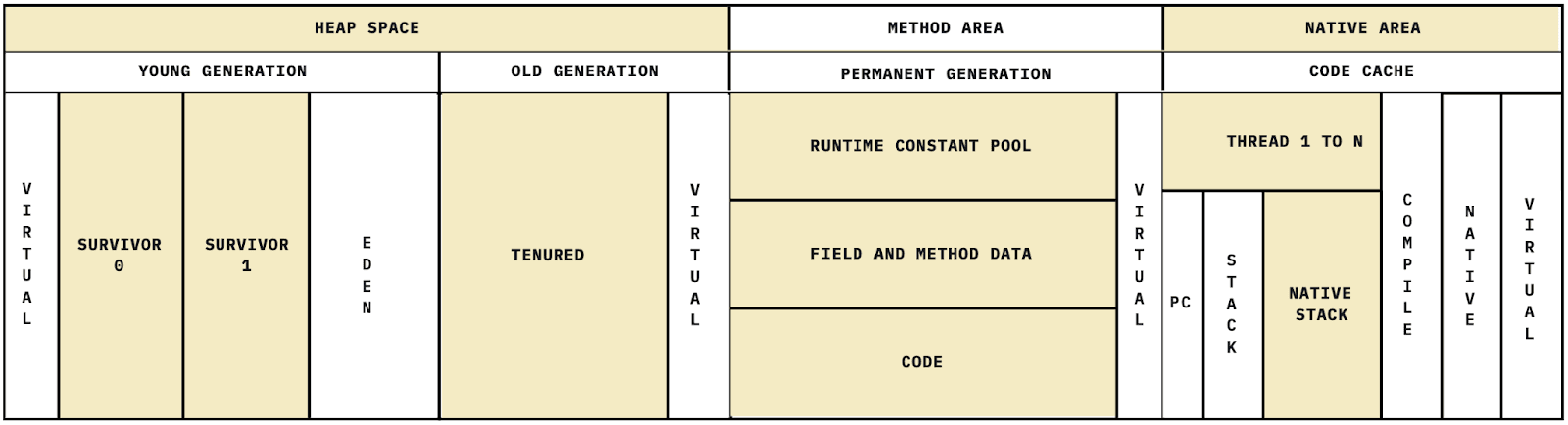
Shared Areas
The JVM has several shared data areas that are accessible to all threads running within the JVM. As a result, multiple threads can concurrently access any of these shared regions.
HEAP
What is HEAP?
The Heap is the JVM's shared home, used to store all objects in the JVM. Each JVM has a single heap, which is therefore shared across all threads. This design saves memory and allows multiple threads to operate on the same objects (with proper synchronization when required).
When an object is created using the new keyword, a region of memory in the heap is allocated to store that object. The heap stores instance data and reference fields, but it does not contain method code—method implementations are stored in the Method Area.
The heap is initialized when the JVM starts. Heap memory is managed by the Garbage Collector (GC)—an automatic memory management system responsible for reclaiming objects that are no longer in use within the JVM.
How is the Heap divided?
In the classic JVM (HotSpot prior to Java 8), the heap is divided into:
- Young Generation
- Old Generation
- Permanent Generation (PermGen) → stores class metadata
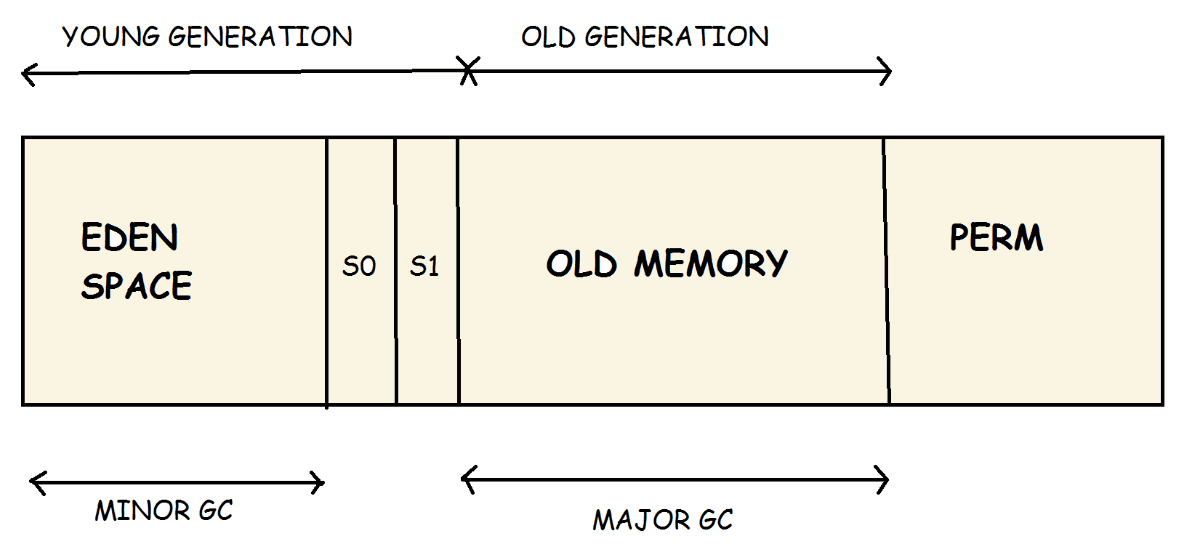
Modern JVM (Java 8+)
- Young Generation
- Old Generation
- Metaspace (replaces PermGen, resides in native memory)
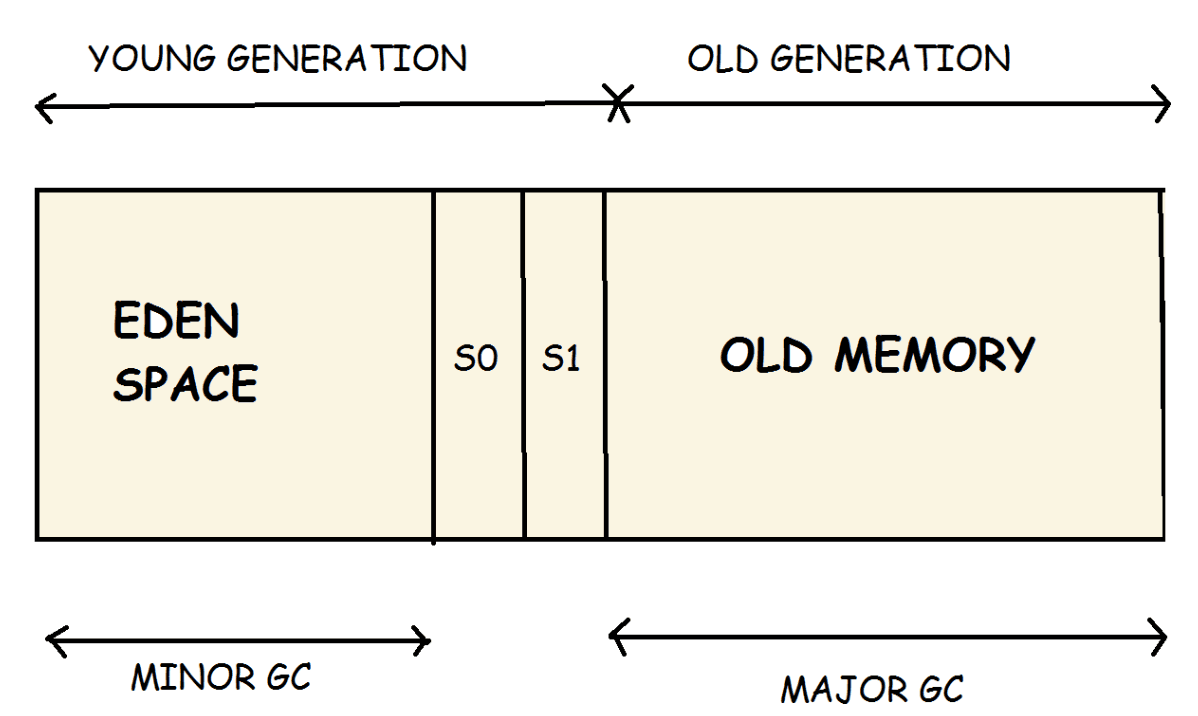
In this section, we will focus on the Young Generation and Old Generation — the two most critical areas that determine application performance:
Young Generation
The Young Generation is the memory region where all newly created objects are allocated. When the Young Generation becomes full, the JVM triggers garbage collection. Garbage collection in this region is known as Minor Garbage Collection.
The Young Generation is divided into three areas: Eden and two Survivor spaces (S0 and S1).
Eden (object allocation area)
- Approximately 90% of newly created objects are allocated here.
- When Eden becomes full → a Minor GC is triggered.
Survivor 0 & Survivor 1
- After each GC cycle, surviving objects are copied from Eden → S0 → S1 → eventually to the Old Generation.
- The JVM uses a moving algorithm, ensuring that one Survivor space is always empty.
Key characteristics of the Young Generation:
- Most newly created objects reside in the Eden space.
- When Eden fills up, a Minor GC is triggered and surviving objects are moved to one of the Survivor spaces.
- Minor GC continues to evaluate surviving objects and moves them to the other Survivor space, ensuring that one Survivor space is always empty.
- Objects that survive multiple GC cycles are eventually promoted to the Old Generation.
Old Generation (Tenured Space)
This is where long-lived objects reside—those that have graduated from the Young Generation.
Characteristics:
- Stores long-lived objects: sessions, caches, singletons
- GC is slower (Major GC / Full GC)
- Uses the Mark–Sweep–Compact algorithm
When does an object get promoted to the Old Generation?
- It survives multiple GC cycles in the Young Generation
- Or Eden is under heavy pressure → early promotion
- Or the object is too large → bypasses Eden and is allocated directly in the Old Generation
Critical risks:
- Full GC can pause the application for several milliseconds to several seconds
- If the Old Generation becomes full →
java.lang.OutOfMemoryError: Java heap space
Object life-cycle in HEAP
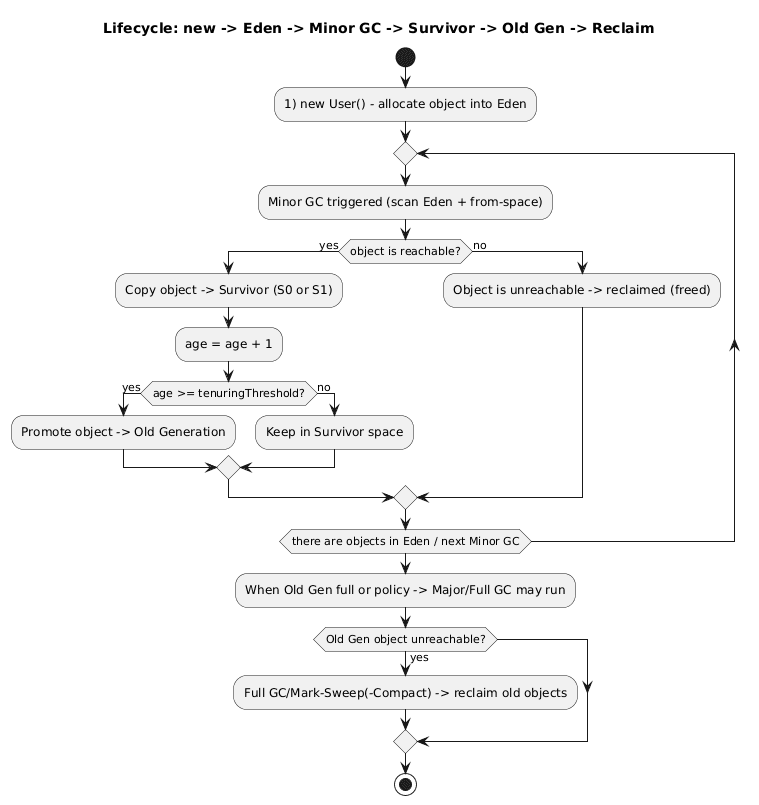
This lifecycle allows the GC to efficiently reclaim short-lived objects while retaining long-lived objects in the Old Generation, improving performance and reducing the risk of memory leaks.
Permanent Generation (PERM)
Before Java 8, the JVM had a special memory region called the Permanent Generation (PermGen). This area was used to store class metadata.
Predicting the amount of memory required for this region was difficult. When the estimation was incorrect, the JVM would often throw: java.lang.OutOfMemoryError: PermGen space
If the root cause was not an actual memory leak, the common workaround was to increase the PermGen size, for example by setting the maximum limit to 256 MB:
java -XX:MaxPermSize=256m
Key points about the Permanent Generation:
- It exists only in Java versions prior to Java 8.
- It stores metadata for classes.
- Its memory usage is difficult to predict.
Metaspace
Because predicting metadata memory requirements was complex and inconvenient, the Permanent Generation was removed starting with Java 8 and replaced by Metaspace. From this version onward, most miscellaneous components were moved into the regular Java heap.
Class definitions are loaded into Metaspace. Metaspace resides in native memory (off-heap), so it does not directly interfere with objects allocated in the Java heap. By default, the size of Metaspace is limited only by the amount of native memory available to the Java process. This design prevents scenarios where adding just a single class would cause the application to fail with: java.lang.OutOfMemoryError: PermGen space
Key points about Metaspace:
- Allowing Metaspace to grow without bounds can lead to heavy swapping and native memory allocation failures.
- If you want to safeguard against this, you can explicitly cap the Metaspace size, for example by setting a maximum of 256 MB:
java -XX:MaxMetaspaceSize=256m
Method Area
Similar to the Heap, each JVM has only one Method Area, which is therefore shared across all threads. This design helps save memory and avoids duplicating metadata for the same class loaded by the Class Loader hierarchy.
| Data type | Description |
|---|---|
| Class Metadata | Class name, field layout, method information |
| Runtime Constant Pool | Constants, method references, symbolic references, literals |
| Class References | References to superclasses, interfaces, annotations, etc. |
In short, the Method Area is where the JVM stores the blueprints of classes required to execute the program.
Runtime Constant Pool (RCP)
As an important part of the Method Area, it contains:
- Compiled constants (int, long, string, etc.)
- References to classes, fields, and methods
When a class is loaded, its Runtime Constant Pool (RCP) is also created and populated with all related constants. This allows the JVM and methods to quickly access these resources without repeatedly re-parsing bytecode.
Note: Although the Runtime Constant Pool may store references to String literals, the pool itself resides in the Method Area and is created per class or per interface at runtime. In contrast, the String Pool is located in the Heap and is a global pool shared across all classes.
Per-thread Data Areas
In addition to the shared common areas that all threads can access at any time, the JVM also creates private memory regions per thread to store thread-specific data. These regions support the concurrent execution of multiple threads by isolating each thread's execution state and local data.
PC Register
The PC (Program Counter) Register is a special register associated with each JVM thread. Its role is to store the memory address of the next bytecode instruction to be executed by the CPU (via the JVM). It acts as a "navigation pointer" that controls the execution flow, ensuring instructions are executed in the correct order or jump to other locations according to program logic.
Each thread running in the JVM has its own private memory called the JVM Stack, and each stack frame within that stack has its own PC Register. This enables independent execution across threads by: tracking the execution progress of the current frame remembering the current and next bytecode instructions to execute
Therefore, the PC Register is part of the thread context, used to store the bytecode position for each individual thread, and it is completely isolated and never shared between threads.
The relationship between the PC Register and the OS Thread Scheduler
On any operating system (Linux, Windows, macOS):
- A CPU cannot truly execute multiple threads simultaneously on the same core.
- The operating system decides:
- which thread is scheduled to run
- on which core it runs
- how long it runs
- when to switch to another thread (context switch)
→ The JVM does not control thread scheduling, it relies on the OS.
The JVM's responsibility is to prepare a separate execution context for each thread, including:
- Stack: containing stack frames for method invocations
- Local variables: variables local to each method, owned exclusively by that thread
- PC Register: storing the next bytecode instruction the thread will execute
This demonstrates that the PC Register is part of the thread context that the OS saves and restores during a thread context switch.
What happens during a context switch?
Consider a practical scenario: Thread A is currently running, and the operating system (OS) decides to switch the CPU to Thread B. At this moment, the OS performs a context switch—and this is where the role of the PC Register becomes critical.
Step 1: OS pauses Thread A — saving its CPU state To resume execution later, the OS must save the full execution context of Thread A, including:
- CPU registers (eax, ebx, r1, r2… depending on CPU architecture)
- Stack pointer (SP) → pointing to the current frame in the thread's stack
- CPU flags (carry, zero, sign, etc.)
- PC Register of Thread A → the most critical piece of information, storing the address of the next bytecode or instruction to execute
Step 2: OS switches to Thread B — restoring Thread B's state
- Load Thread B's PC Register → informs the CPU where Thread B left off
- Load Thread B's CPU registers
- Restore Thread B's stack pointer
- CPU resumes execution at the instruction indicated by Thread B's PC Register
Here, the PC Register acts as the coordinate allowing the OS to pause and resume threads at the exact instruction where they were stopped.
Why is the PC Register important in multithreading?
When multiple threads run concurrently, the JVM needs to know the current instruction of each thread. Having a dedicated PC Register per thread ensures there is no confusion between threads, enabling smooth, correct execution and preventing race conditions in bytecode control flow.
Why having a separate PC Register per thread prevents race conditions in bytecode execution logic
Each thread has its own PC Register, which stores the address of the next bytecode instruction to execute. This ensures that when multiple threads run in parallel, Thread A and Thread B always know exactly where they are in their own bytecode sequence. Each thread continues from its own execution point without being affected by other threads.
Without a dedicated PC Register per thread: If all threads shared a single PC:
- Thread A is executing instruction 120
- Thread B changes the PC to instruction 45 → When Thread A resumes, it would continue from instruction 45 instead of 121, breaking program logic.
With separate PC Registers:
- Thread A independently tracks its bytecode path
- Thread B independently tracks its bytecode path → No thread can interfere with another's control flow, eliminating conflicts at the bytecode level.
In general, we can understand that the PC Register helps prevent race conditions in the control flow. More precisely, the PC Register stores the current bytecode position for each thread, making it a critical part of the thread context. However, the PC Register alone is not sufficient to guarantee consistency—because it only operates while the thread is actively running on a CPU. If the thread is paused, the PC stops updating and its value is saved. Here, the OS Scheduler plays a critical role by ensuring that each CPU core executes only one thread at a time. No two thread contexts can run simultaneously on the same CPU, preventing control-flow conflicts at the CPU level. In other words:
- The OS Scheduler prevents race conditions at the CPU/core execution level
- The PC Register prevents race conditions at the bytecode level for each thread
Java Stack
The Java Stack is the memory area where the JVM manages method invocations and local variables (primitive values and object references) for a single thread.
Each time a method is invoked, a new stack frame is created and pushed onto the stack to store that method's local variables and execution data. When the method completes, its stack frame is popped from the stack and the associated memory is released.
The stack follows the LIFO (Last-In, First-Out) principle.
Primary responsibilities of the Java Stack:
- Manage the lifecycle of Java method calls
- Store local variables and method parameters
- Store execution-related metadata
- Manage stack frames using the LIFO discipline
Structure of Java Stack Memory
The Java Stack is divided into stack frames, with each frame corresponding to a single method invocation.
A Stack Frame consists of:
Local Variable Array It is used to store:
- Local variables (primitives: int, long, boolean, etc.)
- Method parameters
- Object references pointing to objects on the Heap
Note: Objects themselves reside on the Heap; only their references are stored on the Stack.
Operand Stack This is where the JVM performs computations. Unlike a CPU that uses registers, the JVM uses the operand stack to:
- push values
- perform calculations
- pop results
Frame Data (Additional Info) Contains metadata needed for execution:
- Reference to the class's constant pool
- Maximum depth of the operand stack
- Exception handlers
- Return address
These pieces of information allow the JVM to:
- Know which bytecode to execute
- Route exceptions correctly
- Return control to the caller after method completion
Note: This memory area is managed by the JVM and is not the same as the Stack data structure in the Java Collections Framework.
Native Method Stack
The Native Method Stack is a less-discussed but critically important component when Java interacts with operating system code or libraries written in C/C++. It is part of the Runtime Data Areas and operates alongside the Java Stack, Heap, Method Area, and PC Register.
The Native Method Stack is where the JVM "branches out" to native execution, handling tasks that Java bytecode cannot or should not perform. These methods are invoked via JNI (Java Native Interface).
It is completely separate from the Java Stack, which contains frames for Java methods.
Key difference compared to the Java Stack:
| Native Method Stack | Java Stack |
|---|---|
| Managing and Executing Methods Written in Native Languages (C/C++) | Managing and Executing Java Methods |
Purpose of the Native Method Stack
The Native Method Stack is designed for scenarios where Java cannot operate directly, such as:
- Interacting with the operating system: Accessing OS-level resources or system APIs (network, devices, drivers, etc.)
- Performance optimization: Certain computationally intensive or low-level tasks run faster when implemented in C/C++
- Calling system or third-party libraries: Many libraries exist only in C/C++ (e.g., OpenSSL, graphics libraries, codecs)
- Native code within the JVM itself: Even the JVM uses native methods internally (e.g.,
Object.wait(),System.arraycopy())
This stack allows Java threads to safely and efficiently execute native code alongside standard Java bytecode execution.
Structure and Operation of the Native Method Stack
The Native Method Stack functions similarly to the Java Stack:
- Each thread has its own Native Method Stack (thread-local)
- Operates on the LIFO (Last-In, First-Out) principle
- Whenever a native method is invoked, the JVM creates a Native Frame to store:
- Parameters passed to the native method
- Pointer to the native function in the C/C++ library
- Native local variables
- JNI execution state
- Information to return to the Java Stack after method completion
Key difference from Java Stack Frame:
- Native Frames do not store bytecode
- They store structures compatible with C/C++ and the operating system, tailored for native execution
Conclusion
Understanding JVM memory management is essential for building high-performance, scalable Java applications. In this article, we've explored:
Shared Memory Areas:
- Heap: The JVM's primary memory for objects, divided into Young Generation (Eden, S0, S1) and Old Generation, with a sophisticated lifecycle managed by Garbage Collection
- Metaspace: Replaces PermGen in Java 8+, storing class metadata in native memory
- Method Area & Runtime Constant Pool: Store class blueprints and constants shared across all threads
Per-Thread Memory Areas:
- PC Register: Tracks each thread's bytecode execution position, preventing control-flow conflicts
- Java Stack: Manages method invocations with stack frames containing local variables, operand stack, and frame data
- Native Method Stack: Handles execution of native C/C++ code through JNI
Key Insights:
- Thread Safety: Shared areas (Heap, Method Area) require synchronization; thread-local areas (Stack, PC Register) are naturally safe
- Memory Optimization: Understanding generational GC helps optimize object lifecycles and reduce pause times
- Performance: Know where data lives to make informed decisions about caching, object pooling, and memory tuning
Now that you understand where classes live and how memory is organized, you're ready to explore how the JVM actually executes your code. In the next article, we'll dive into the Execution Engine—covering the Interpreter, JIT Compiler with hotspot optimization, and how the Garbage Collector reclaims memory.
📚 Continue Learning
Previous in Series: JVM Architecture & Class Loading — Understanding Java's Foundation
Next in Series: JVM Execution Engine — From Bytecode to Native Code
Discover how the JVM transforms bytecode into optimized machine code, manages hotspot detection, and orchestrates garbage collection for peak performance.
This article is part of the JVM Fundamentals Series. Each post builds on the previous one to give you a comprehensive understanding of how Java applications run under the hood.