
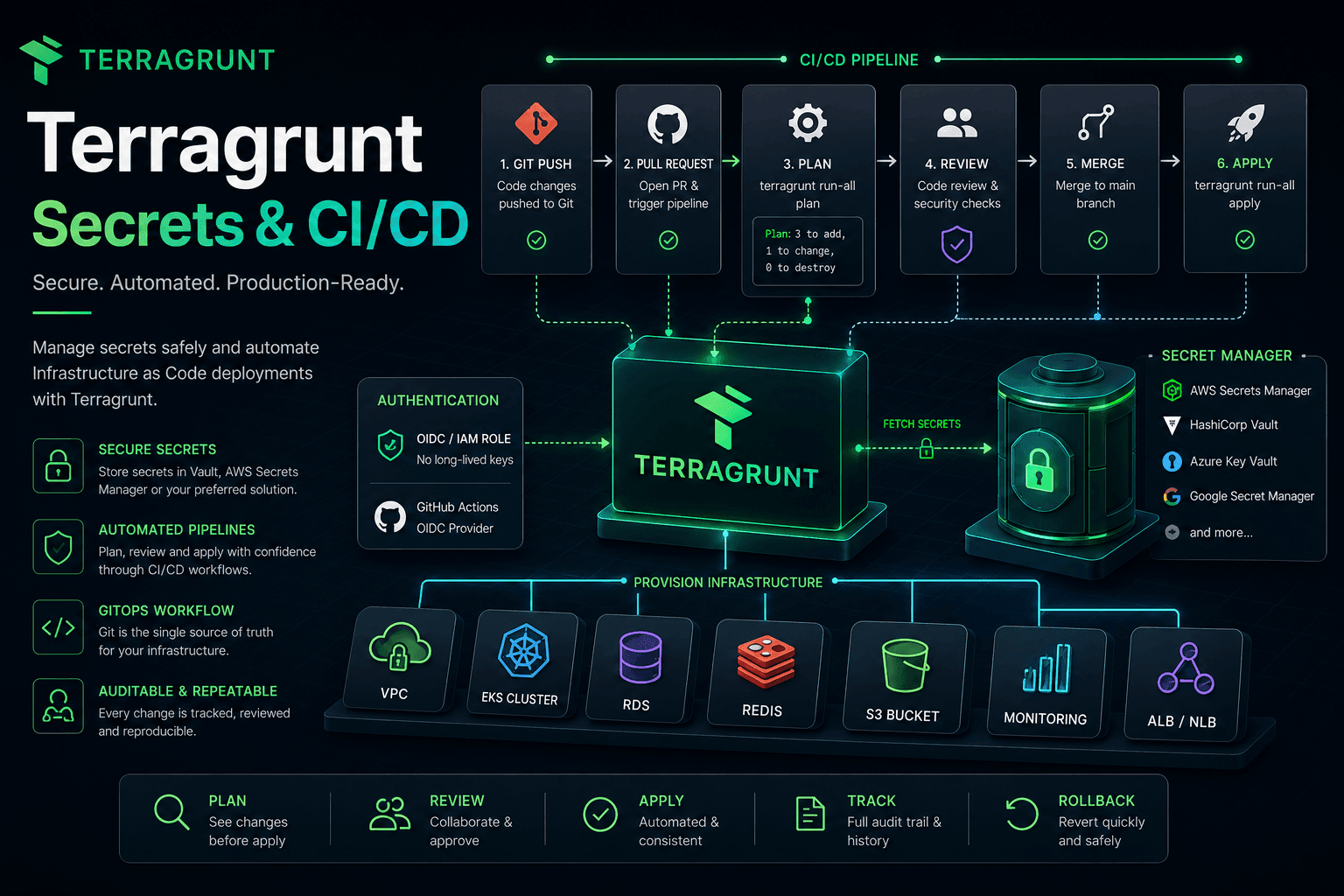
Managing Secrets and CI/CD with Terragrunt
Throughout the previous articles, we've built almost every piece of a production-ready Terragrunt repository:
- Repository Structure
- DRY Configuration
- Dependency Management
- Multi-Environment
- Multi-Account
At this point, we're capable of managing hundreds of Terraform projects.
However, one important question still remains.
How do you deploy infrastructure automatically while keeping it secure?
This is where CI/CD pipelines and Secrets Management become essential.
Infrastructure Needs CI/CD Too
Many engineers associate CI/CD only with application development.
A typical application pipeline looks like this:
Developer

↓

Git Push

↓

Build

↓

Deploy
Infrastructure deserves the same level of automation.
Developer

↓

Git Push

↓

Terraform Plan

↓

Review

↓

Terraform Apply
Instead of deploying application code, the pipeline deploys infrastructure.
Infrastructure should follow the same engineering standards as software.
Why Not Deploy from Your Laptop?
During the early stages of a project, it's common to run:
terragrunt applydirectly from a personal machine.
This works for small teams.
As the organization grows, however, problems quickly appear.
For example:
- Nobody knows who deployed the latest changes.
- Deployment history is difficult to track.
- Changes may bypass code review.
- Every engineer might use a different Terraform version.
- Someone could accidentally deploy directly to Production.
Production infrastructure should never depend on someone's laptop.
CI/CD Becomes the Only Deployment Path
A common production workflow looks like this:
Developer

↓

Pull Request

↓

CI

↓

Terraform Plan

↓

Code Review

↓

Merge

↓

CD

↓

Terragrunt Apply
Developers no longer execute apply directly against Production.
Instead, every infrastructure change passes through an automated deployment pipeline.
This creates an auditable and repeatable deployment process.
Terraform Plan Inside Pull Requests
A popular workflow is:
Git Push

↓

Pipeline

↓

terragrunt plan

↓

Comment on Pull Request
Reviewers immediately see something like:
+ Create 2 Resources

~ Update 1 Resource

- Destroy 0 Resources
Every infrastructure change becomes visible before the code is merged.
This significantly reduces deployment risk.
Apply Only After Merge
Many organizations follow a simple rule:
Pull Request

↓

Review

↓

Approved

↓

Merge

↓

Production Apply
This ensures that infrastructure changes cannot reach production without review.
For this reason, many engineering teams require every infrastructure modification to go through the Pull Request process.
Secrets Don't Belong in Git
One of the most common mistakes is committing secrets into files such as:
terraform.tfvars
containing values like:
db_password

api_key

access_key

secret_key
and then pushing them into Git.
This is one of the most serious security mistakes an engineering team can make.
A repository should contain source code—not sensitive credentials.
Terragrunt Is Not a Secret Manager
This distinction is important.
Terragrunt does not manage secrets.
It does not encrypt passwords.
It does not store API keys.
Instead, it integrates infrastructure with dedicated secret management systems.
Examples include:
- AWS Secrets Manager
- Azure Key Vault
- Google Secret Manager
- HashiCorp Vault
- Doppler
- Infisical
- 1Password Secrets Automation
Terragrunt acts as the bridge—not the vault itself.
Separate Secrets from Configuration
A well-designed infrastructure repository clearly separates:
Infrastructure Configuration
from
Sensitive Data
A typical architecture looks like:
Infrastructure

↓

Terragrunt

↓

Secret Manager
During deployment, the CI/CD pipeline retrieves secrets from the Secret Manager.
The repository itself never stores passwords or API keys.
Cloud Provider Credentials
One common question is:
Where should AWS Access Keys be stored?
The answer is:
They shouldn't.
Modern CI/CD platforms typically authenticate using:
- IAM Roles
- OIDC
- Workload Identity
- Service Principals
instead of long-lived access keys.
This completely removes static credentials from your repository and deployment pipeline.
Today, OIDC has become the recommended authentication mechanism for platforms such as GitHub Actions and many other CI/CD systems.
Promoting Changes Across Environments
Production deployments rarely happen immediately.
A common promotion flow is:
Development

↓

Testing

↓

Staging

↓

Production
Infrastructure changes should follow the same path.
This allows problems to be discovered early before they reach Production.
Git Becomes the Single Source of Truth
One of the fundamental principles of GitOps is:
Git is the single source of truth.
Every infrastructure change begins with a Git commit.
No manual changes in the cloud console.
No ad-hoc deployment scripts.
No undocumented modifications.
The repository always represents the desired state of the infrastructure.
Rollbacks Become Simpler
If an infrastructure change introduces a problem,
rolling back is often as simple as:
Git Revert

↓

Pipeline

↓

Terragrunt Apply
The infrastructure returns to its previous desired state.
No manual recovery steps.
No remembering which resources changed.
This is one of the greatest advantages of Infrastructure as Code.
A Typical Production Pipeline
A production-ready pipeline often looks like this:
Git Push

↓

Static Checks

↓

Terragrunt Format Check

↓

Terraform Validate

↓

Terragrunt Plan

↓

Security Scan

↓

Manual Approval

↓

Terragrunt Apply
Larger organizations may extend this with:
- Cost Estimation
- Policy as Code
- Compliance Validation
- Drift Detection
Regardless of complexity, the core principle remains the same:
Every infrastructure change should be verified before deployment.
Common Mistakes to Avoid
When adopting Terragrunt in production, avoid these common mistakes:
- Running
terragrunt applydirectly against Production. - Committing secrets into Git.
- Using long-lived cloud access keys in CI/CD.
- Skipping the
planstep. - Deploying infrastructure without code review.
- Making manual changes through the cloud console.
These practices are among the leading causes of operational incidents in large infrastructure environments.
Summary
Terragrunt does not replace a CI/CD platform or a Secret Manager.
Instead, it integrates naturally with both to create a modern Infrastructure as Code workflow.
A mature production workflow typically follows these principles:
- Every change starts in Git.
- Secrets are stored in a dedicated Secret Manager.
- CI automatically runs
plan. applyonly happens after approval.- Every infrastructure change is traceable and auditable.
When combined with GitOps and CI/CD, Terragrunt transforms infrastructure from a collection of manual operations into a secure, automated, and repeatable engineering process.
Congratulations!
You've reached the end of the Terraform & Terragrunt series.
From the very fundamentals of Infrastructure as Code to managing production-ready infrastructure at scale, we've covered more than 20 articles together, including topics such as:
Terraform Fundamentals
- Infrastructure as Code and the mindset behind modern infrastructure management.
- How Terraform works, from planning to applying changes.
- Terraform State and the importance of Remote State.
- Variables, Outputs, and Data Sources.
- Everyday Terraform features such as
for_each,count,locals,dynamic,depends_on, andlifecycle. - Repository design, importing existing infrastructure, and common mistakes when working with Terraform.
Terragrunt for Production
- Why Terraform alone is often not enough for large-scale systems.
- Organizing repositories across multiple environments and cloud accounts.
- Applying the DRY principle with
include,generate, andread_terragrunt_config. - Managing dependencies between infrastructure components.
- Handling secrets and building Infrastructure as Code deployment pipelines with CI/CD.
I hope this series has helped you not only understand how to use Terraform and Terragrunt, but also the engineering mindset behind designing, organizing, and operating Infrastructure as Code for real-world production systems.
If there's only one thing I'd like you to take away from this entire series, it's this:
Infrastructure as Code is not just about writing
.tforterragrunt.hclfiles. It's about building an infrastructure management workflow that enables collaboration, governance, automation, and long-term sustainability.
Terraform gives us a way to define infrastructure as code.
Terragrunt helps us manage infrastructure at scale.
Git allows us to track and review every infrastructure change.
CI/CD enables us to deploy infrastructure safely, consistently, and automatically.
When these pieces come together, Infrastructure as Code becomes much more than a tool—it becomes a foundation for building reliable, scalable, and maintainable platforms that teams can confidently evolve over time.
Thank you for following along throughout this Terraform & Terragrunt series. I hope the knowledge and practical experience shared here will help you build, manage, and operate infrastructure with greater confidence in your own projects.
See you in the next series, where we'll continue exploring Cloud, DevOps, and Software Engineering!