
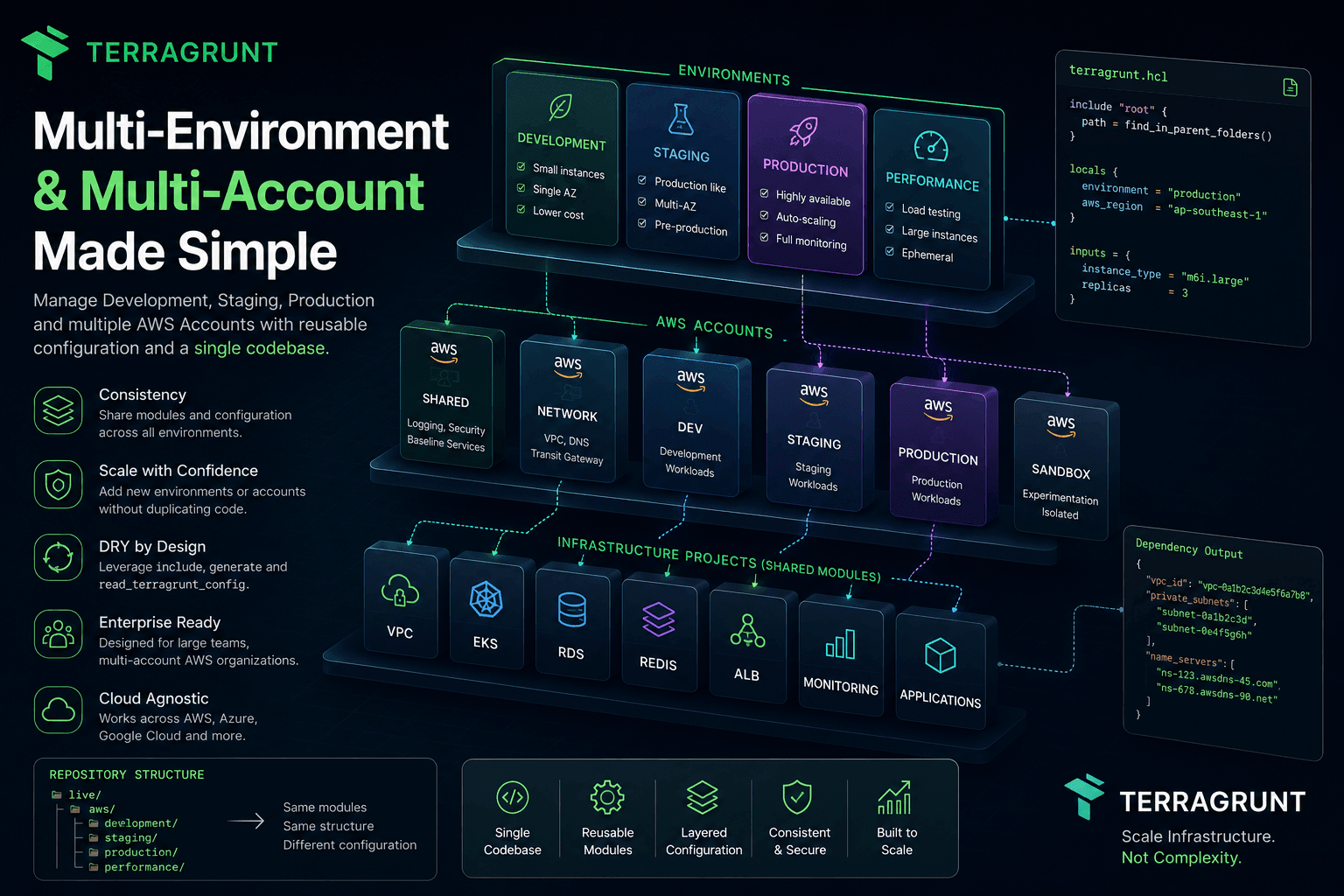
Managing Multi-Environment and Multi-Account Infrastructure with Terragrunt
In the previous article, we explored how Terragrunt builds dependency graphs to deploy infrastructure in the correct order automatically.
However, as infrastructure continues to grow, another challenge quickly appears.
How do you manage multiple environments and multiple cloud accounts without copying your entire repository?
This is one of the biggest reasons Terragrunt has become a standard choice for production Infrastructure as Code.
One Environment Is Never Enough
Almost every modern system has multiple environments.
For example:
Development

↓

Testing

↓

Staging

↓

Production
Each environment deploys almost the same infrastructure.
For example:
VPC

EKS

RDS

Redis

Monitoring

Applications
The infrastructure itself rarely changes.
What changes is the configuration.
What Actually Changes Between Environments?
A Development environment usually contains:
- Smaller instances
- Smaller databases
- A single Availability Zone
- Fewer Kubernetes nodes
- Lower operating costs
Production, on the other hand, may require:
- Multi-AZ deployments
- Auto Scaling
- Multiple Node Groups
- Larger databases
- Automated backups
- Full monitoring
- High availability
The architecture remains nearly identical.
Only the configuration values change.
The Typical Terraform Approach
Many teams initially organize their repository like this:
terraform/

dev/

staging/

production/
Each directory contains:
provider.tf

backend.tf

versions.tf

variables.tf

main.tf
Then they simply copy the Development directory into Production.
Over time, the repository becomes:
dev/

staging/

production/

sandbox/

demo/

performance/
Whenever the backend or provider configuration changes, every directory must be updated.
This is exactly the configuration duplication we've discussed throughout this series.
Terragrunt Takes a Different Approach
Terragrunt views each environment as:
A different set of configuration values.
Not as an entirely new Terraform project.
For example:
live/

development/

staging/

production/
All three environments use the same Terraform Modules.
Only these values differ:
- Region
- AWS Account
- CIDR Block
- Instance Size
- Replica Count
- Environment Name
Everything else is shared.
Shared Modules, Different Configuration
Suppose you have an EKS module:
modules/

eks/
Development uses:
cluster_size = 2
Production uses:
cluster_size = 10
The Terraform Module itself never changes.
There is no duplicated code.
Only the input values are different.
This mindset is one of the most important concepts in Infrastructure as Code.
It's Not Just About Multiple Environments
Real organizations often manage multiple AWS accounts as well.
For example:
AWS Organization

├── Shared
├── Security
├── Networking
├── Development
├── Staging
├── Production
└── Sandbox
Or perhaps:
Customer A

Customer B

Customer C
Or even:
US Region

EU Region

APAC Region
Each account can reuse the same Terraform Modules.
Only the configuration changes.
How Does the Repository Scale?
A common repository structure looks like this:
live/

aws/

development/

staging/

production/
Each environment then contains:
development/

network/

eks/

database/

monitoring/
Production follows the exact same structure.
This consistency provides a huge advantage.
Developers can immediately understand how the infrastructure is organized simply by looking at the directory hierarchy.
Layering Configuration
Terragrunt encourages configuration to be separated into multiple layers.
For example:
Root
Contains:
- Terraform version
- Provider version
- Backend configuration
- Common tags
AWS Account
Contains:
- AWS Account ID
- IAM Role
- Default Region
Environment
Contains:
- Environment name
- CIDR blocks
- Common variables
Service
Contains:
- CPU
- Memory
- Replica count
- Instance size
With this hierarchy, changing configuration at one level automatically affects everything below it.
Adding a New Environment
Imagine your company introduces a new environment:
Performance Testing
With plain Terraform, you would probably:
- Copy the Development directory
- Rename the folder
- Update the backend
- Update the provider
- Update variables
With Terragrunt, you simply create:
performance/
Then define:
- AWS Account
- Region
- Environment Name
Everything else is inherited automatically.
This is the real power of shared configuration.
Multi-Account Doesn't Mean Multiple Repositories
Some organizations create separate repositories:
terraform-production

terraform-development

terraform-staging
Maintaining consistency across these repositories quickly becomes difficult.
Terragrunt allows multiple AWS accounts to live inside the same repository.
Each account simply represents another configuration layer.
The repository remains consistent regardless of how many accounts exist.
A Repository That Lasts for Years
Today, your organization might have:
2 Environments
Next year:
5 Environments
Later:
12 AWS Accounts
Eventually:
300 Terraform Projects
If the repository was designed correctly from the beginning, the architecture rarely needs to change.
You simply add:
- New environments
- New accounts
- New services
The existing structure continues to work.
This long-term scalability is one of the defining characteristics of a production-grade repository.
Multi-Environment Isn't Limited to AWS
Although this series primarily uses AWS examples, the same ideas apply to:
- Microsoft Azure
- Google Cloud
- Kubernetes
- On-premises infrastructure
Any infrastructure platform with multiple deployment environments can benefit from the same Terragrunt repository organization.
Summary
Terragrunt doesn't create environments or cloud accounts.
Instead, it provides a consistent way to manage them.
Rather than creating dozens of nearly identical Terraform projects, Terragrunt encourages you to:
- Reuse Terraform Modules
- Share configuration
- Organize environments into layers
- Organize accounts into layers
- Inherit configuration throughout the repository
As a result, repositories can scale from a handful of projects to hundreds while remaining readable, maintainable, and easy for new engineers to understand.
Next Article
In the next article, we'll learn how to manage secrets and integrate CI/CD with Terragrunt, covering best practices for protecting sensitive information and automating infrastructure deployments in production environments.