
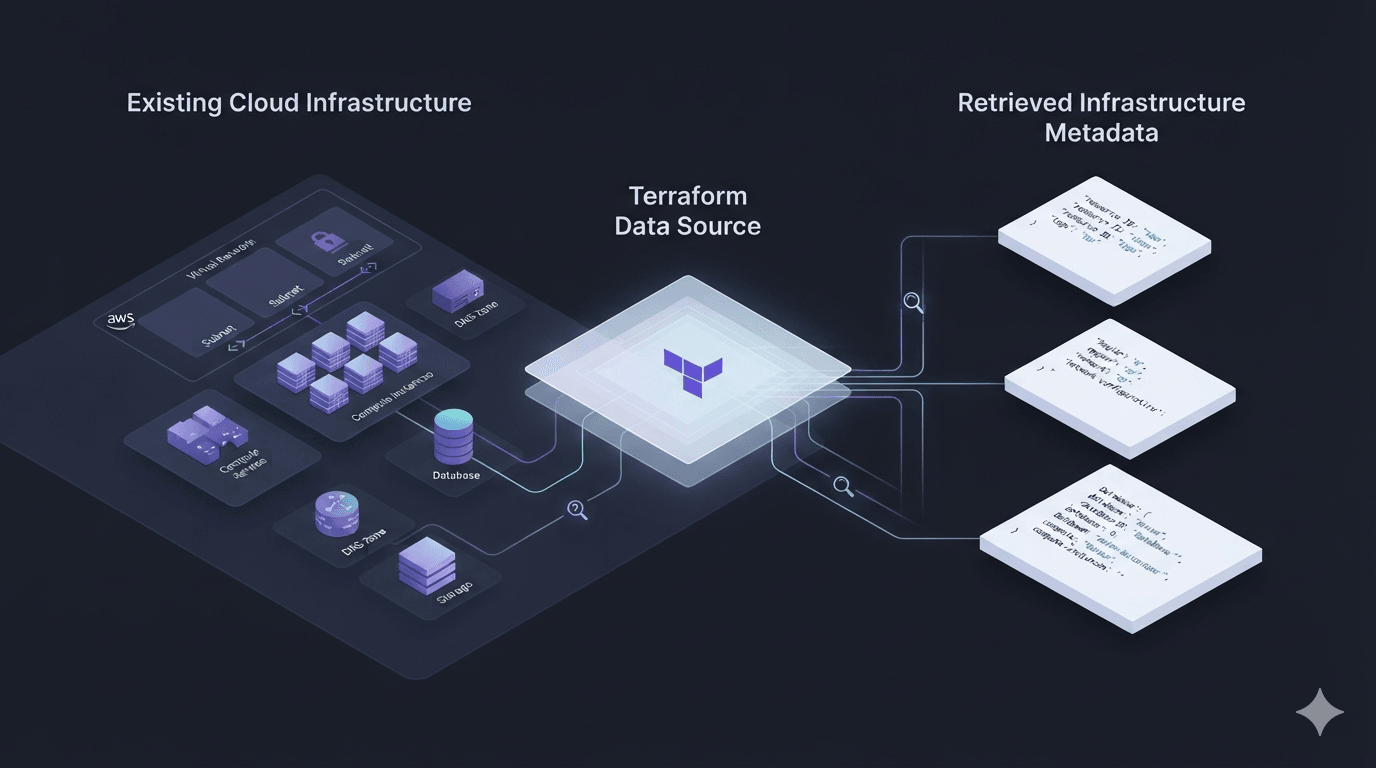
Terraform Data Sources — Reading Existing Infrastructure Instead of Creating It
In the previous article, we learned about Terraform Modules and how they help us organize infrastructure into reusable building blocks.
However, in the real world, not every piece of infrastructure is created by Terraform.
Many resources already exist.
For example:
- A VPC managed by the platform team.
- A database provisioned by the DBA team.
- An EKS cluster created using an infrastructure blueprint.
- A DNS hosted zone that has existed for years.
- An AWS account containing hundreds of existing resources.
If Terraform could only create new infrastructure, it would be difficult to adopt in large organizations.
This is exactly why Data Sources exist.
Terraform Doesn't Only Create Resources
When people first learn Terraform, they often imagine a workflow like this:
Terraform
      ↓
Create Resource
In reality, Terraform has another extremely important capability:
Terraform
      ↓
Read Existing Infrastructure
      ↓
Use Information
      ↓
Create New Infrastructure
In other words:
Terraform doesn't just create infrastructure.
It can also read infrastructure that already exists.
That's the purpose of Data Sources.
Resource vs Data Source
Terraform has two concepts that are often confused.
Resource
A Resource is responsible for managing the lifecycle of infrastructure.
For example:
resource "aws_vpc" "main" {
  cidr_block = "10.0.0.0/16"
}
Terraform will:
- create
- update
- destroy
this resource whenever necessary.
Terraform owns its entire lifecycle.
Data Source
A Data Source has only one responsibility:
Read information.
For example:
data "aws_vpc" "main" {
  default = true
}
Terraform will:
- call the AWS API
- find the default VPC
- retrieve its information
- store the result in memory
Terraform does not create the VPC.
Terraform does not modify the VPC.
Terraform does not delete the VPC.
It simply reads it.
An Easy Way to Think About It
Imagine Terraform as an office employee.
There are two different actions.
Resource
"Create a new employee."
Terraform will:
- create the record
- manage it
- update it
- remove it
Data Source
"Find an employee named John."
Terraform opens the company database.
Reads the information.
Uses it later.
Nothing is modified.
Data Source Syntax
The syntax looks almost identical to a Resource.
data "<provider>_<type>" "<name>" {

}
For example:
data "aws_availability_zones" "available" {}Or:
data "aws_caller_identity" "current" {}Or:
data "aws_region" "current" {}Or:
data "aws_vpc" "main" {
  default = true
}
After Terraform reads the resource, its attributes become available just like Resource attributes.
For example:
data.aws_vpc.main.idOr:
data.aws_region.current.nameWhen Are Data Sources Read?
Terraform's workflow now becomes:
Configuration
      ↓
Read Data Sources
      ↓
Refresh Resources
      ↓
Build Execution Plan
      ↓
Apply
One important difference is that Terraform always reads Data Sources before generating the execution plan.
This ensures that the plan uses the latest information from the cloud provider.
A Real-World Example
Suppose your company already has a production VPC.
You only need to deploy an EC2 instance.
You shouldn't recreate the VPC.
Instead:
data "aws_vpc" "main" {
  tags = {
    Name = "production-vpc"
  }
}
Then:
resource "aws_security_group" "web" {
  vpc_id = data.aws_vpc.main.id
}
And later:
resource "aws_instance" "web" {
  subnet_id = data.aws_subnets.private.ids[0]
}
Terraform will do this:
Read Existing VPC
        ↓
Read Existing Subnets
        ↓
Create Security Group
        ↓
Create EC2
Nothing is recreated.
Another Example
Which AWS account is Terraform currently using?
You can retrieve it with:
data "aws_caller_identity" "current" {}Then:
output "account_id" {
  value = data.aws_caller_identity.current.account_id
}
Or:
output "user_id" {
  value = data.aws_caller_identity.current.user_id
}
This is one of the most commonly used Data Sources in reusable Terraform modules.
Reading the Current Region
Terraform can also detect the active AWS region.
data "aws_region" "current" {}Then:
output "region" {
  value = data.aws_region.current.name
}
Instead of hardcoding:
ap-southeast-1
your modules become much more portable.
Reading Availability Zones
Another very common example.
data "aws_availability_zones" "available" {}Then:
resource "aws_subnet" "private" {
  availability_zone = data.aws_availability_zones.available.names[0]
}
Terraform always retrieves the available AZs automatically.
Instead of hardcoding:
ap-southeast-1a
your module works across different AWS regions.
Combining Resources and Data Sources
This is the most common architecture.
                Existing Infrastructure

                  VPC
                  Subnet
                  Route Table
                  Hosted Zone

                        │
                        ▼

                 Terraform Data Sources

                        │
                        ▼

                Terraform Resources

                  EC2
                  ECS
                  RDS
                  Lambda
Existing infrastructure is accessed through Data Sources.
New infrastructure is created with Resources.
Together, they form a complete infrastructure deployment.
Are Data Sources Stored in Terraform State?
This is a common question.
The answer is:
Yes.
But unlike Resources, Terraform does not manage their lifecycle.
Terraform stores the retrieved information in the state for the current operation.
Whenever you run terraform plan again, Terraform reads the Data Sources again to ensure the information is up to date.
Common Mistakes
1. Expecting a Data Source to Create Resources
For example:
data "aws_vpc" "main" {
    cidr_block = "10.0.0.0/16"
}
Some beginners assume Terraform will create a VPC.
It won't.
Terraform will search for a VPC matching that CIDR block.
If none exists:
No matching VPC found
2. Hardcoding Resource IDs
For example:
vpc_id = "vpc-123456"This makes your module difficult to reuse.
A better approach is:
vpc_id = data.aws_vpc.main.id3. Reading Too Many Data Sources
Every Data Source requires one or more API calls.
A large project might look like this:
Terraform Plan
      ↓
500 API Calls
Planning becomes noticeably slower.
Only query the information you actually need.
Best Practices
- Use Data Sources only for existing infrastructure.
- Avoid hardcoding resource IDs whenever they can be discovered automatically.
- Combine Resources and Data Sources instead of trying to manage everything within a single Terraform project.
- Give Data Sources meaningful names such as
current,main,default, orproduction. - Avoid unnecessary Data Sources because each one requires API requests to the cloud provider.
Summary
Data Sources are one of Terraform's most important features.
If Resources allow Terraform to create and manage infrastructure, Data Sources allow Terraform to understand infrastructure that already exists.
In real-world projects, almost every Terraform configuration uses both Resources and Data Sources together.
You'll rarely encounter an environment where Terraform creates everything from scratch.
Instead, Terraform usually starts by reading existing infrastructure before provisioning anything new.
That's why Data Sources are an essential part of working with Terraform.
Next Up
So far we've covered:
- Terraform Configuration
- Terraform State
- Terraform Modules
- Terraform Data Sources
However, there's still one fundamental concept that many beginners misunderstand:
How do Terraform Variables actually work?
Many developers think Variables are simply a place to store values like:
- Region
- Instance Type
- Environment
In reality, Variables are the foundation for building reusable, configurable Terraform modules that can be deployed across multiple environments.
In the next article, we'll dive deep into Terraform Variables, including how they work, variable scopes, precedence rules, and best practices used in production environments.