
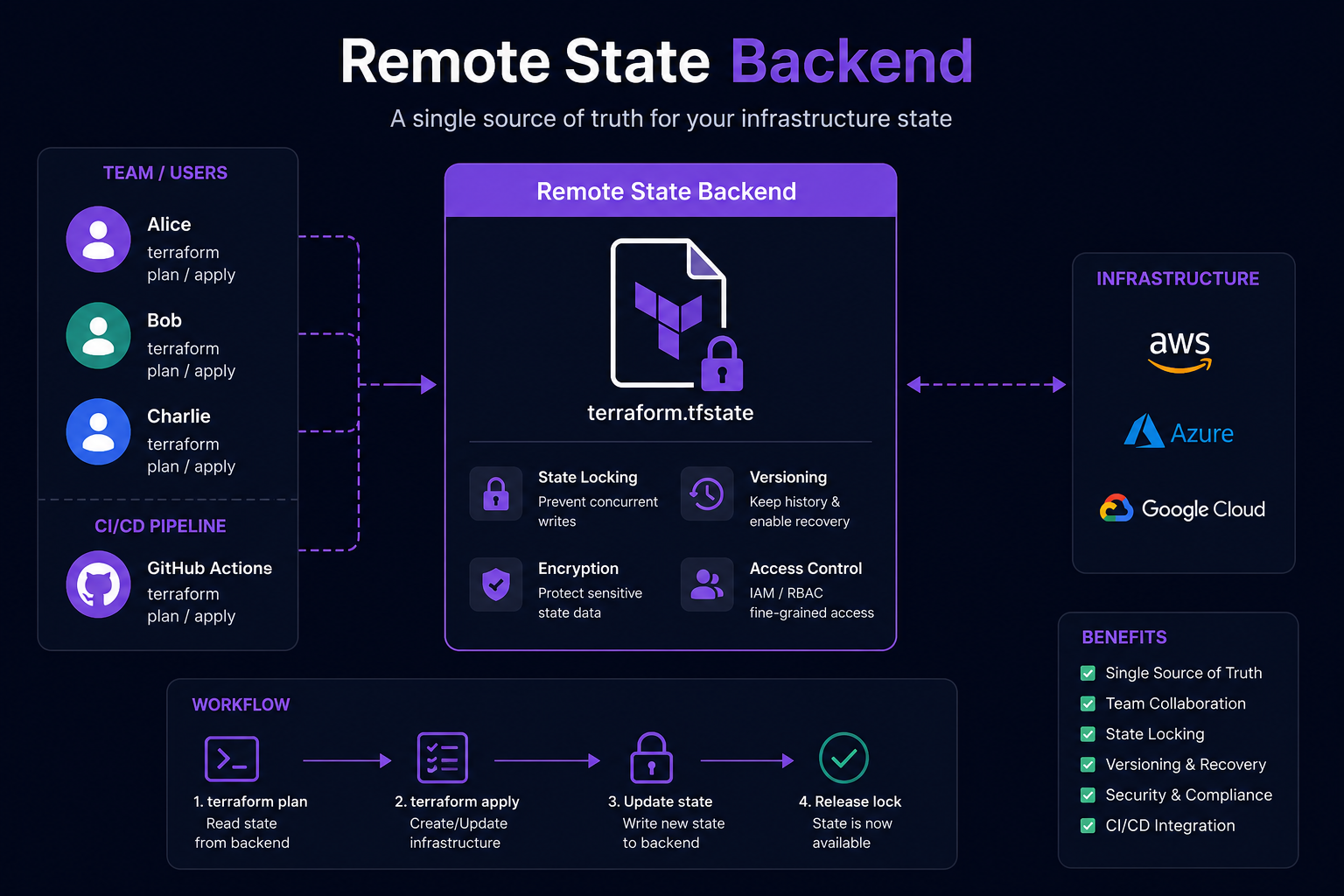
Terraform Remote State Backends — The Foundation of Every Production-Grade Terraform Project
In the previous article, we explored how to bring existing infrastructure under Terraform management using terraform import and import blocks.
Once a resource has been imported, Terraform starts tracking it through Terraform State.
That leads to a much more important question:
Where should Terraform State be stored?
When you are working alone on a local machine, the answer seems straightforward:
terraform.tfstateBut once a project starts involving:
- multiple engineers
- multiple environments
- CI/CD pipelines
- multiple repositories
- multiple teams managing infrastructure
storing State on a developer's laptop quickly becomes a serious problem.
That is why almost every production-grade Terraform project starts with a Remote State Backend.
How important is Terraform State?
Earlier in this series, we learned that Terraform follows a workflow similar to this:
Configuration
      ↓
Terraform State
      ↓
Refresh
      ↓
Execution Plan
      ↓
Apply
Terraform does not manage infrastructure by looking at configuration files alone.
It also depends on State.
State contains the information Terraform needs to understand which real infrastructure objects belong to which resources in the configuration.
For example:
resource "aws_s3_bucket" "assets" {
  bucket = "company-assets"
}
After the first successful Apply, Terraform stores information similar to this:
{
  "resources": [
    {
      "type": "aws_s3_bucket",
      "name": "assets",
      "instances": [
        {
          "attributes": {
            "id": "company-assets",
            "arn": "arn:aws:s3:::company-assets"
          }
        }
      ]
    }
  ]
}
Terraform does not need to rediscover which bucket belongs to aws_s3_bucket.assets every time it runs.
It reads that mapping from State.
A useful way to think about it is:
Configuration describes what we want.
State represents what Terraform remembers it manages.
If the State is missing, outdated, or corrupted, Terraform may produce an incorrect Execution Plan.
How does the Local Backend work?
If no backend is configured, Terraform uses the Local Backend.
Conceptually, this is equivalent to:
terraform {
  backend "local" {}
}
After running:
terraform init
terraform apply
Terraform creates a State file in the current working directory:
terraform.tfstateA simple project might look like this:
infrastructure/
├── main.tf
├── variables.tf
├── outputs.tf
├── providers.tf
└── terraform.tfstate
When Terraform runs, the process looks roughly like this:
Read local state
        ↓
Refresh infrastructure
        ↓
Build execution plan
        ↓
Apply changes
        ↓
Update local state
The entire State exists only on the machine that executed Terraform.
This is perfectly acceptable for:
- learning Terraform
- local experiments
- sandboxes
- demos
- proofs of concept
- small personal projects
Production environments are different.
What happens when multiple people work on the same project?
Imagine a team with two infrastructure engineers:
Alice
Bob
Both clone the same Terraform repository:
terraform-project/
├── main.tf
├── variables.tf
└── outputs.tf
The terraform.tfstate file is not committed to Git.
After running Terraform locally, Alice has:
Alice's machine
├── main.tf
└── terraform.tfstate
Bob also has:
Bob's machine
├── main.tf
└── terraform.tfstate
The files may initially contain the same information.
But they are two completely independent copies.
Suppose Alice adds an EC2 instance and runs:
terraform applyAWS creates the instance:
EC2 instance
ID = i-0123456789abcdef0
Alice's local State is updated with that resource.
Bob's State is not.
Bob still has an older view of the infrastructure.
If Bob later runs:
terraform applyTerraform starts with:
Bob's configuration
        +
Bob's outdated state
        +
Current infrastructure
Terraform will refresh the real infrastructure before creating the plan, but the local State is still not a shared source of truth.
As the project grows, this situation becomes increasingly dangerous.
It can lead to:
- inconsistent resource mappings
- conflicting changes
- unexpected resource replacement
- duplicated resources
- incomplete State
- infrastructure drift
- plans that differ between engineers
Terraform is not the problem here.
The problem is that every engineer is working with a different version of the State.
Should terraform.tfstate be committed to Git?
This is often the first solution teams consider.
If everyone needs the same State, why not commit it to the repository?
For example:
git add terraform.tfstate
git commit -m "Update Terraform state"
git push
Other engineers could pull the latest State before running Terraform.
At first, this seems reasonable.
In practice, Git is one of the worst places to store Terraform State.
Git is not a State database
Git is designed to version source code.
It is not designed to coordinate concurrent infrastructure operations.
Suppose Alice and Bob both pull the latest repository.
The current State is:
State version 25Alice runs:
terraform applyBob runs the same command at nearly the same time:
terraform applyBoth processes start from State version 25.
Alice creates a new database and completes first.
Her State becomes:
State version 26Bob creates a new security group, but his Apply is still based on State version 25.
When Bob completes, his local State also becomes:
State version 26The two State files now represent different changes.
State version 25
        ├── Alice Apply → Version 26 with database
        └── Bob Apply   → Version 26 with security group
Git may detect a conflict later when both engineers attempt to push.
But by that point, the real infrastructure has already changed.
Git cannot prevent two Terraform processes from modifying infrastructure at the same time.
It can only show that two files changed afterward.
This is exactly the problem that State Locking is designed to solve.
Terraform State may contain sensitive data
Another common misconception is that State only stores resource IDs.
In reality, State can contain much more information, including:
- resource IDs
- ARNs
- internal IP addresses
- public IP addresses
- database endpoints
- usernames
- connection strings
- generated passwords
- certificates
- provider metadata
- access tokens
- output values
Consider this resource:
resource "random_password" "database" {
  length  = 32
  special = true
}
You may expose it through a sensitive output:
output "database_password" {
  value     = random_password.database.result
  sensitive = true
}
Marking the output as sensitive prevents Terraform from displaying the value in normal CLI output.
It does not remove the value from State.
Terraform still needs the real value to track the resource.
A simplified State entry may contain:
{
  "type": "random_password",
  "name": "database",
  "instances": [
    {
      "attributes": {
        "length": 32,
        "result": "generated-secret-value"
      }
    }
  ]
}
This means anyone who can read the State may be able to read the secret.
If State is committed to Git:
- secrets remain in Git history
- deleting the current file does not remove old versions
- repository readers may access infrastructure details
- forks and backups may preserve the data
- CI caches may retain copies
- credential rotation becomes necessary after exposure
That is why Terraform State must be treated as sensitive data.
The
sensitiveattribute controls presentation, not State encryption.
State changes frequently
Terraform State is not a static configuration file.
It may change whenever you:
terraform applyIt may also change when you:
- import a resource
- move a resource address
- remove an object from State
- replace a resource
- upgrade a provider
- migrate a backend
- update resource metadata
- change module structure
In a large project, a State file may contain thousands of lines of JSON.
Committing it to Git creates:
- large and noisy diffs
- frequent merge conflicts
- difficult pull request reviews
- unnecessary repository history
- a higher risk of merging the wrong State
- accidental exposure of sensitive information
Terraform configuration belongs in Git.
Terraform State belongs in a system designed to store and protect State.
What does a production project need?
A production-grade Terraform project needs more than a shared JSON file.
Its State should provide:
- one centralized source of truth
- safe access for multiple engineers
- protection against concurrent writes
- version history
- backup and recovery
- encryption
- access control
- CI/CD integration
That is the purpose of a Terraform Remote State Backend.
How does a Remote State Backend work?
The idea behind a Remote State Backend is actually quite simple.
Instead of storing the State file on each developer's machine, Terraform stores it in a centralized location that everyone shares.
The workflow becomes:
              Terraform Apply

                     │
                     ▼

          Read Remote State
                     │
                     ▼
        Refresh Infrastructure
                     │
                     ▼
          Execution Plan
                     │
                     ▼
             Apply Changes
                     │
                     ▼
         Update Remote State
Developers no longer own individual copies of the State.
Instead, the State becomes a shared asset for the entire team.
For example:
             Alice
                │
                │
             Bob
                │
                │
         GitHub Actions
                │
                ▼
      Remote State Backend
                │
                ▼
         terraform.tfstate
Whether Terraform is executed from a developer's laptop or from a CI/CD pipeline, everyone works with exactly the same State.
This creates a single source of truth for the infrastructure.
A Backend only stores State
Many beginners assume that a Remote Backend somehow runs Terraform for them.
It does not.
A Remote Backend is responsible only for storing and managing Terraform State.
Terraform itself still runs on:
- a developer's workstation
- GitHub Actions
- GitLab CI
- Jenkins
- Azure DevOps
- CircleCI
- or any other machine capable of executing Terraform
A simplified view looks like this:
Terraform CLI
      │
      ├── AWS API
      ├── Azure API
      ├── Google Cloud API
      │
      ▼
Infrastructure

Terraform CLI
      │
      ▼
Remote Backend
      │
      ▼
Terraform State
The backend does not provision infrastructure.
Terraform communicates directly with cloud provider APIs.
The backend simply stores the State before and after each operation.
Because of this separation, if the backend becomes temporarily unavailable, your infrastructure does not disappear.
Terraform simply loses access to its State until the backend becomes available again.
What is State Locking?
One of the biggest advantages of a Remote Backend is State Locking.
Suppose Alice runs:
terraform applyTerraform performs the following sequence:
Acquire Lock
      ↓
Read State
      ↓
Refresh
      ↓
Create Plan
      ↓
Apply Changes
      ↓
Update State
      ↓
Release Lock
While this process is running, the State is locked.
If Bob tries to execute another Apply at the same time:
terraform applyTerraform may return an error similar to:
Error acquiring the state lockBob must wait until Alice's operation finishes.
This guarantees that only one process can modify the State at any given time.
Why is State Locking so important?
Imagine a project without locking.
Both Alice and Bob start at the same moment.
State Version 100Alice creates:
EC2 InstanceBob creates:
Security GroupAlice finishes first.
The backend now stores:
State Version 101Bob, however, is still working with Version 100.
When Bob finishes, his process uploads another Version 101 that does not include Alice's latest changes.
One update effectively overwrites the other.
The infrastructure itself may still exist correctly.
However, Terraform's memory of that infrastructure is now incomplete.
This situation is known as State Corruption.
Recovering from a corrupted State is rarely pleasant.
Depending on the severity, you may need to:
- investigate every affected resource
- compare the real infrastructure with Terraform State
- import resources again
- manually repair resource addresses
- recreate parts of the State
Preventing corruption is far easier than repairing it.
That is exactly what State Locking is designed to do.
Should you use Force Unlock?
Sometimes you may encounter this error:
Error acquiring the state lockThis does not necessarily mean another engineer is currently running Terraform.
Possible causes include:
- a CI job was cancelled
- a runner crashed
- a network connection was interrupted
- Terraform exited unexpectedly
- a previous lock was never released
Terraform provides a command for these situations:
terraform force-unlock LOCK_IDThis command removes the existing lock manually.
However, it should only be used when you are absolutely certain that no Terraform process is still running.
Imagine Alice is still halfway through an Apply.
If Bob force unlocks the State and starts another Apply, two Terraform processes may now write to the same State simultaneously.
The result is almost identical to having no locking at all.
As a general rule:
Never use
terraform force-unlockuntil you have confirmed that the previous Terraform operation has completely stopped.
State Versioning
Another major advantage of Remote Backends is State Versioning.
Instead of maintaining only the latest State, many backends can keep previous versions as well.
For example:
Version 52After another Apply:
Version 53If Version 53 turns out to be problematic, you still have access to Version 52.
Version history becomes extremely valuable when someone accidentally:
- imports the wrong resource
- removes resources from State
- migrates a backend incorrectly
- applies changes to the wrong workspace
- performs an incorrect state move
- damages the State during maintenance
Restoring an earlier version should always be done carefully.
Nevertheless, having historical versions is far safer than relying on a single local file.
Common Remote Backends
Terraform supports many different backend implementations.
In practice, most production projects use one of the following:
| Backend | Platform |
|---|---|
| Amazon S3 | AWS |
| Azure Blob Storage | Microsoft Azure |
| Google Cloud Storage | Google Cloud |
| HCP Terraform | HashiCorp |
Terraform also supports additional backends such as:
- Consul
- PostgreSQL
- Kubernetes
- HTTP Backend
- S3-compatible object storage (MinIO, Cloudflare R2, and others)
However, the vast majority of production environments use one of the four major options above.
Amazon S3 Backend
The Amazon S3 backend is probably the most widely used Terraform backend today.
A simple configuration looks like this:
terraform {
  backend "s3" {
    bucket = "company-terraform-state"
    key    = "production/network/terraform.tfstate"
    region = "ap-southeast-1"
  }
}
In production, teams typically combine S3 with additional features such as:
- Bucket Versioning
- Server-side Encryption
- IAM access policies
- S3 Native Locking (Terraform 1.10+)
Earlier Terraform versions commonly paired S3 with DynamoDB for state locking.
Azure Blob Storage Backend
For organizations running on Microsoft Azure, Azure Blob Storage is the standard choice.
Example:
terraform {
  backend "azurerm" {
    resource_group_name  = "terraform"
    storage_account_name = "tfstateprod"
    container_name       = "state"
    key                  = "production.tfstate"
  }
}
Azure implements State Locking using Blob Lease, allowing Terraform to safely coordinate concurrent operations.
Google Cloud Storage Backend
Google Cloud provides its own native backend as well.
Example:
terraform {
  backend "gcs" {
    bucket = "terraform-state-production"
    prefix = "network"
  }
}
Google Cloud Storage supports object versioning and integrates naturally with Google Cloud IAM, making it a common choice for teams building on GCP.
HCP Terraform (Terraform Cloud)
If you prefer not to manage your own backend infrastructure, HashiCorp provides HCP Terraform (formerly Terraform Cloud).
Instead of creating and maintaining your own S3 bucket, Azure Storage Account, or Google Cloud Storage bucket, Terraform stores the State directly within HashiCorp's managed platform.
A simple configuration looks like this:
terraform {
  cloud {
    organization = "my-company"

    workspaces {
      name = "production-network"
    }
  }
}
Besides storing Terraform State, HCP Terraform also provides features such as:
- Remote Execution
- Workspace Management
- Variable Management
- Policy as Code
- Cost Estimation
- Team-based Access Control
- Audit Logs
- Run History
For teams already using the HashiCorp ecosystem, HCP Terraform can eliminate the operational overhead of maintaining a custom backend.
Migrating from Local State to a Remote Backend
One question many engineers ask is:
If my project already uses Local State, do I need to recreate my infrastructure?
Fortunately, the answer is no.
Terraform provides built-in support for migrating an existing State to a new backend.
For example, after adding an S3 backend:
terraform {
  backend "s3" {
    bucket = "company-terraform-state"
    key    = "production/network.tfstate"
    region = "ap-southeast-1"
  }
}
Run:
terraform initTerraform detects that the backend configuration has changed and displays a message similar to:
Backend configuration changed.

Do you want to copy the existing state to the new backend?
Answer:
yesTerraform then performs the migration automatically:
Read Local State
        ↓
Upload State
        ↓
Configure Backend
        ↓
Switch to Remote Backend
Your infrastructure remains exactly the same.
Only the location of the State changes.
Things to consider before migrating
Although the migration process is usually straightforward, there are a few best practices worth following.
Migrate when nobody is applying changes
Avoid migrating while:
- another engineer is running
terraform apply - a deployment pipeline is executing
- multiple pull requests are being deployed
- infrastructure changes are actively taking place
The safest time to migrate is during a maintenance window or another agreed deployment period.
Back up your State first
Before making any changes, create a backup of the current State.
For example:
cp terraform.tfstate terraform.tfstate.backupTerraform creates backup files in some situations, but keeping your own copy costs almost nothing and provides an additional safety net.
Never edit the State file manually
Terraform State is an internal implementation detail.
Although the file is stored as JSON, it should not be treated like a normal configuration file.
For example:
{
  "resources": [
    ...
  ]
}
Changing resource addresses, IDs, or metadata manually can easily cause Terraform to:
- lose track of resources
- recreate existing infrastructure
- replace resources unexpectedly
- produce incorrect execution plans
Whenever you need to interact with State, use Terraform's built-in commands instead.
For example:
terraform state listterraform state showterraform state mvterraform state rmThese commands understand Terraform's internal data model and are far safer than editing raw JSON.
Best Practices for Remote State
After working on production Terraform projects, a few practices consistently prove their value.
Separate State for each environment
Avoid sharing one State across environments such as:
dev
staging
production
Instead, isolate them.
For example:
dev.tfstate

staging.tfstate

production.tfstate
Or organize them by environment and component:
dev/network.tfstate

staging/network.tfstate

production/network.tfstate
Keeping environments isolated reduces the risk of accidental changes crossing environment boundaries.
Enable Versioning
If your backend supports versioning, enable it.
For example, with Amazon S3:
Bucket Versioning
Enabled
Version history provides an important recovery mechanism if State is accidentally modified or corrupted.
Encrypt your State
Terraform State often contains sensitive information.
Your backend should therefore encrypt stored State.
Examples include:
- Amazon S3 Server-side Encryption
- Azure Storage Encryption
- Google Cloud Storage Encryption
Encryption at rest should be considered a standard production requirement rather than an optional feature.
Apply the principle of least privilege
Not everyone on the team needs permission to modify production State.
A common model is:
Developers:
Read
Plan
CI/CD pipeline:
ApplyInfrastructure administrators:
Full administrative accessLimiting write access significantly reduces the chance of accidental production changes.
Never commit State to Git
This is arguably the most important recommendation.
Your Git repository should contain:
- Terraform configuration
- reusable modules
- documentation
- variable definitions
It should not contain:
terraform.tfstate

terraform.tfstate.backup
These files should be ignored.
A typical .gitignore includes:
*.tfstate
*.tfstate.*
Treat Terraform State as operational data—not source code.
Summary
Terraform State is the memory of Terraform.
If your configuration defines the infrastructure you want, State records the infrastructure Terraform currently manages.
For individual experiments, Local State is often sufficient.
However, once a project involves multiple engineers, CI/CD pipelines, or production environments, centralized State management becomes essential.
A Remote State Backend provides:
- a single source of truth
- safe team collaboration
- state locking
- version history
- encryption
- backup and recovery
- seamless CI/CD integration
In practice, one of the very first steps in building a production-grade Terraform platform is establishing a reliable Remote State Backend.
It is every bit as important as writing clean Terraform code.
In the next article, we'll step away from Terraform features and look at something even more valuable: the real mistakes I've made while using Terraform in production, along with the lessons learned from managing infrastructure at scale.