
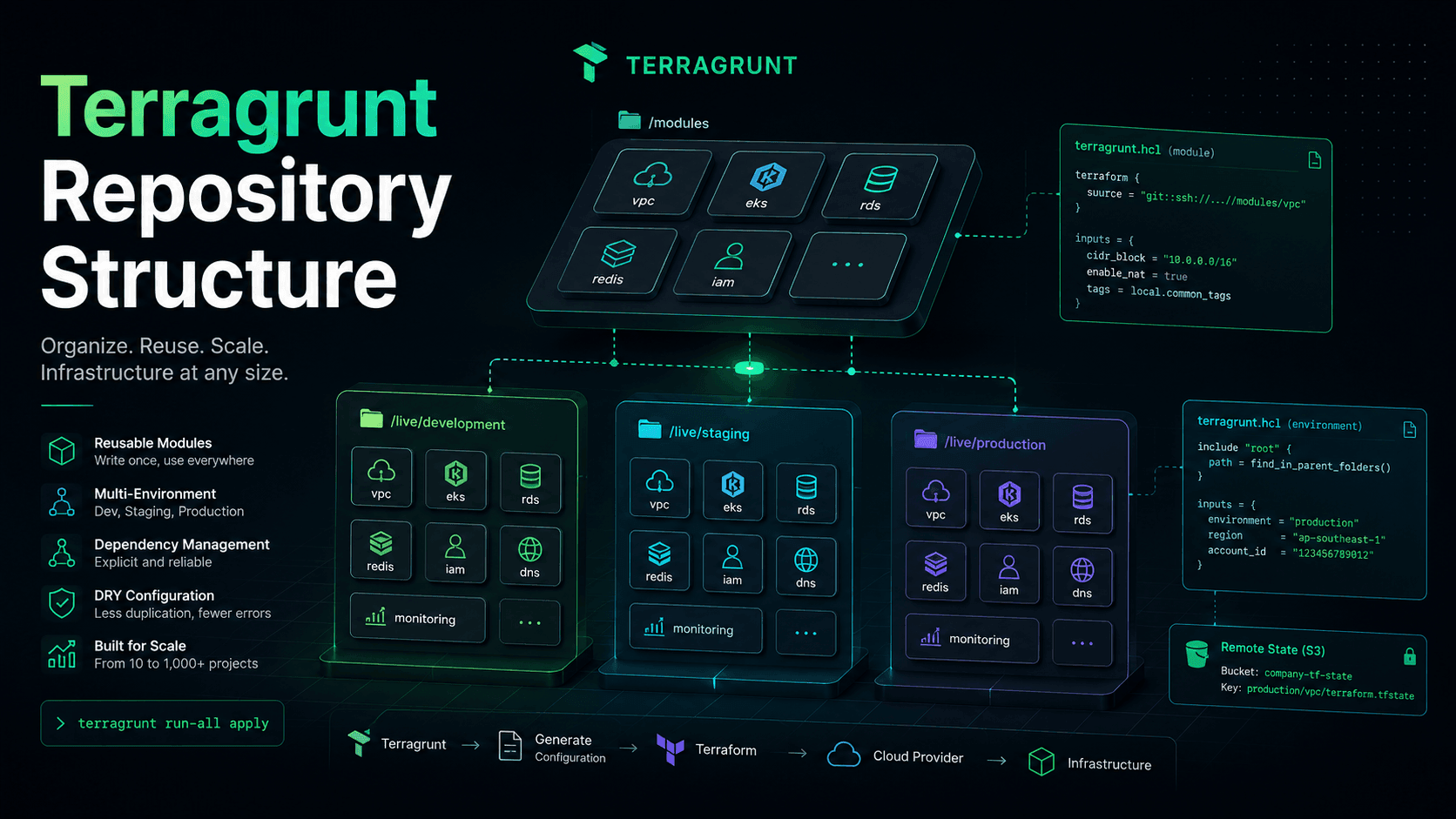
Building a Production-Grade Repository Structure with Terragrunt
In the previous article, we learned why Terragrunt exists.
Terraform is excellent at managing infrastructure.
However, as the number of Terraform projects grows, organizing repositories, reusing configuration, and managing dependencies become increasingly difficult.
Terragrunt is much more than a tool for reducing copy-and-paste.
More importantly, it introduces a consistent way to organize infrastructure repositories, allowing teams to scale their Infrastructure as Code for years without turning the repository into a maze.
In this article, we'll build the mindset behind designing a production-grade Terragrunt repository.
The Challenge of a Large Repository
Imagine your company has:
- 4 environments
- 5 AWS accounts
- 60 Terraform modules
Production alone contains:
VPC
EKS
IAM
RDS
Redis
CloudFront
S3
ALB
Monitoring
Logging
Secrets
...
If every module becomes an independent Terraform project, you'll quickly end up managing hundreds of projects.
At that point, your repository becomes much more than just a collection of folders.
You need answers to questions like:
- Where should modules live?
- Where should environments be organized?
- How is Production different from Development?
- Where should shared infrastructure go?
- Which projects should new engineers deploy first?
- How can every repository remain consistent?
This is one of the biggest challenges of Infrastructure as Code.
How Many Beginners Organize Their Repository
Repositories often start like this:
terraform/

vpc/
eks/
rds/
redis/
Everything looks clean.
Then new environments are added.
terraform/

dev-vpc/
prod-vpc/
staging-vpc/

dev-rds/
prod-rds/

dev-eks/
prod-eks/
A few months later:
terraform/

dev-vpc
prod-vpc
uat-vpc
sandbox-vpc

dev-rds
prod-rds
uat-rds

dev-redis
prod-redis

dev-monitoring
prod-monitoring

...
The repository gradually becomes messy.
Folder names lose consistency.
Nobody is sure which modules belong to which environments.
It's difficult to understand which AWS account each project targets.
These are clear signs that the repository structure needs to be redesigned.
Separate Modules from Live Infrastructure
One of the most important Terragrunt principles is:
Terraform Modules and deployed Infrastructure are two completely different things.
Modules only describe how to create resources.
For example:
modules/

vpc/
eks/
rds/
redis/
Modules should not know:
- which environment they're deployed to
- which AWS account they're using
- which region they're targeting
- which backend they're configured with
They simply define reusable infrastructure.
The actual deployments belong somewhere else.
For example:
live/

dev/
production/
This is where Terragrunt starts to shine.
A Typical Terragrunt Repository
A common repository structure looks like this:
infrastructure/

├── modules/
│
│   ├── vpc/
│   ├── eks/
│   ├── rds/
│   ├── redis/
│   └── ...
│
└── live/
    ├── dev/
    ├── staging/
    └── production/
Here:
modules
Contains reusable Terraform Modules.
No state files.
No backend configuration.
No environment-specific values.
Just reusable infrastructure building blocks.
live
This is where real deployments happen.
Each folder represents an environment.
For example:
live/

dev/
staging/
production/
Every environment reuses the same Terraform modules.
This is fundamentally different from copying entire Terraform projects.
Inside an Environment
Let's look at the Production environment.
production/

vpc/
eks/
rds/
redis/
network/
dns/
Each directory represents a single Terraform project.
For example:
production/

vpc/
Inside, you'll often find nothing more than:
terragrunt.hcl
No hundreds of Terraform lines.
No backend configuration.
No provider configuration.
No duplicated variables.
Terragrunt generates all of those automatically.
That's one of the reasons production repositories remain clean and easy to navigate.
Supporting Multiple AWS Accounts
The repository can also be organized by cloud accounts.
For example:
live/

aws/

development/
staging/
production/

azure/

development/
production/
Or by organizational responsibility:
live/

shared/

production/

network/

application/

production/

platform/

production/
Whether you organize by cloud provider, AWS account, or business unit is entirely up to your organization.
The important part is that the overall structure remains consistent.
Layering Configuration
One of Terragrunt's core philosophies is:
The more reusable a configuration is, the higher it belongs in the directory hierarchy.
Think of the hierarchy like this:
Root

↓

Production

↓

VPC
Global configuration such as:
- Terraform version
- Provider version
- Backend configuration
- Default tags
belongs near the root.
Production-specific configuration belongs at the environment level.
VPC-specific configuration belongs only inside the VPC project.
This approach prevents the same configuration from being copied dozens of times.
In the next article, we'll see how the include feature makes this layered configuration possible.
A Terragrunt Project Is Surprisingly Small
For example:
production/

eks/

terragrunt.hcl
That file may contain only a few lines.
Everything else—
- backend
- providers
- remote state
- variables
- default tags
—is inherited from higher levels of the repository.
This makes each project remarkably easy to understand.
When opening a project, engineers immediately see only what is unique about it.
Why Does This Structure Scale So Well?
Imagine your repository today contains:
10 projects
One year later:
80 projects
Two years later:
250 projects
If the repository was designed correctly from the beginning, its architecture hardly needs to change.
You simply add another directory:
production/

new-service/
Or:
staging/

new-service/
Everything else is inherited automatically.
This is exactly why many organizations successfully manage hundreds of Terraform projects within a single repository.
Repositories Aren't Just for Terraform
Many people think:
As long as Terraform can read it, the repository is good enough.
In reality, the repository also needs to serve:
- Developers
- DevOps Engineers
- SREs
- Platform Engineers
- Security Engineers
- New team members
A well-organized repository makes it easy to answer questions like:
- Which environment owns this infrastructure?
- Where is this module used?
- Which AWS account does this project deploy to?
- Where should a new service be added?
That's why repository structure is considered part of the overall system architecture—not just folder organization.
Summary
A good Terragrunt repository isn't one with the most folders.
It's one with clear rules.
The most important principles are:
- Separate Terraform Modules from Live Infrastructure.
- Keep every Terraform project small.
- Store only environment-specific configuration inside each environment.
- Move shared configuration higher in the hierarchy.
- Design the repository for years of growth, not just today's infrastructure.
This foundation makes it possible to fully leverage Terragrunt's capabilities in production.
Next Article
In the next article, we'll explore Terragrunt's most powerful feature: DRY Configuration with include, generate, and read_terragrunt_config, the mechanisms that eliminate nearly all duplicated configuration across Terraform projects.