
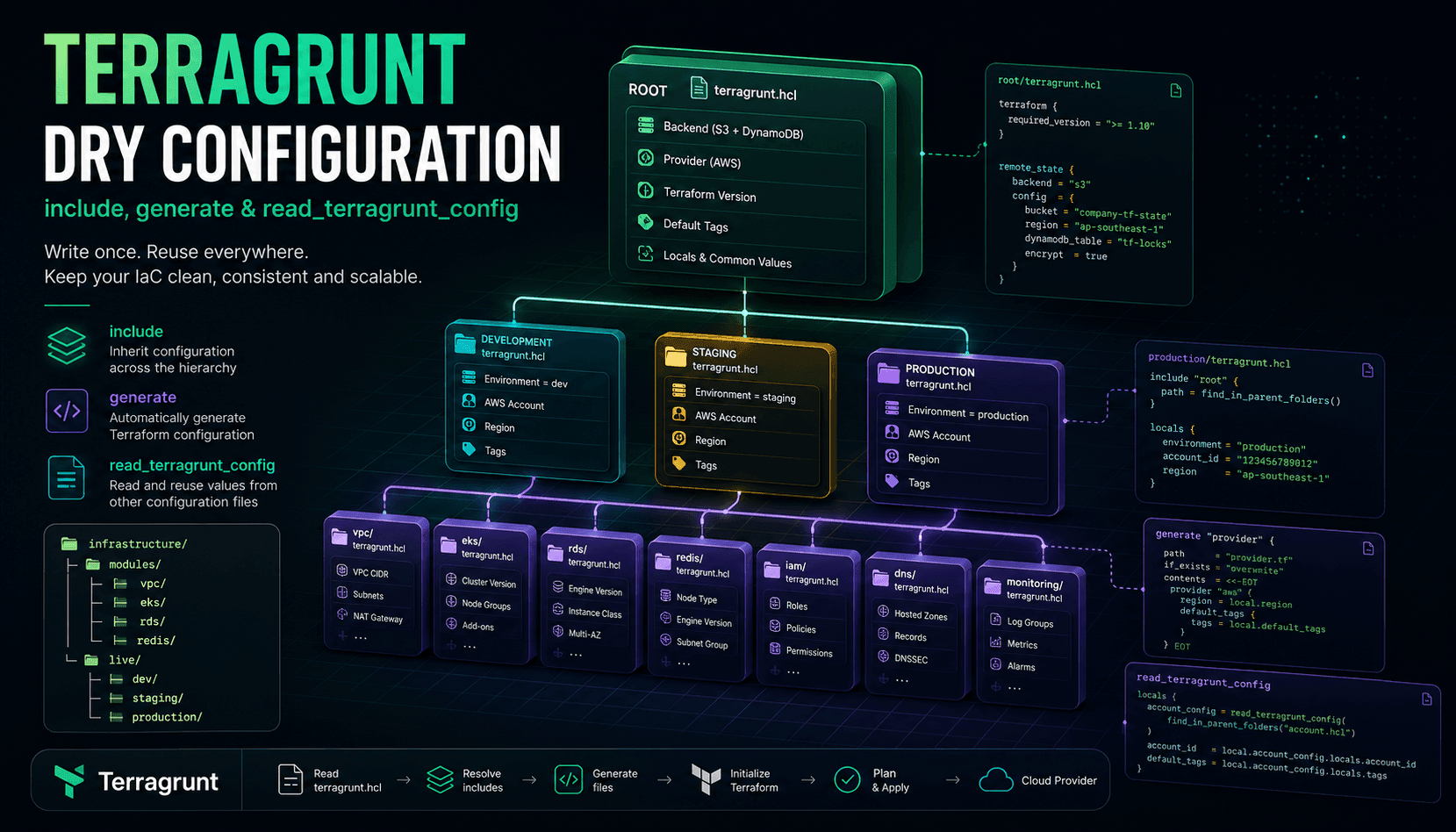
DRY Configuration with Terragrunt: include, generate, and read_terragrunt_config
In the previous article, we designed a production-ready Terragrunt repository.
We separated our infrastructure into:
- Modules
- Live Infrastructure
- Environments
- Terraform Projects
But one important question still remains:
How can hundreds of Terraform projects share the same configuration without relying on copy-and-paste?
This is where Terragrunt truly shines.
Its three most important features are:
includegenerateread_terragrunt_config
Together, these features eliminate nearly all duplicated configuration in large Terraform repositories.
Terraform's Configuration Duplication Problem
Imagine you have forty Terraform projects.
Every project requires:
- Backend configuration
- Provider configuration
- Default tags
- Terraform version
- AWS region
- Common variables
With plain Terraform, you'll repeatedly write:
terraform {
  required_version = ">= 1.10"
}
Project after project.
The provider configuration is duplicated as well.
provider "aws" {
  region = "ap-southeast-1"

  default_tags {
    tags = {
      ManagedBy = "Terraform"
    }
  }
}
The same happens for:
- backend configuration
- provider versions
- remote state
- common variables
After a few months, your repository contains hundreds of nearly identical files.
Need to change the AWS region?
You'll probably modify dozens of Terraform projects.
That's exactly the problem Terragrunt is designed to solve.
include — Inheriting Configuration
The include block is probably the most frequently used feature in Terragrunt.
Consider this directory structure:
live/

terragrunt.hcl

production/

terragrunt.hcl

eks/

terragrunt.hcl
The root configuration:
live/

terragrunt.hcl
Defines common settings such as:
- backend
- provider
- shared locals
- remote state
- default tags
A child project only needs:
include "root" {
  path = find_in_parent_folders()
}
Terragrunt automatically inherits the configuration.
This is conceptually similar to inheritance in object-oriented programming.
How Does include Work?
Imagine the following hierarchy:
Root

↓

Production

↓

EKS
The root defines:
Backend
Provider
Default Tags
The Production layer defines:
Environment
AWS Account
The EKS project defines:
Cluster Version
Node Configuration
After Terragrunt resolves all include blocks, the EKS project effectively sees:
Backend

+

Provider

+

Default Tags

+

Environment

+

Cluster Configuration
Each level only defines the configuration that is unique to that level.
include Doesn't Copy Files
An important concept to remember:
Terragrunt does not copy configuration files.
Instead, it builds a configuration hierarchy.
For example:
Root

↓

Production

↓

VPC
When you run:
terragrunt applyTerragrunt:
- reads the Root configuration
- reads the Production configuration
- reads the VPC configuration
- merges everything together
Only then does it generate the final Terraform configuration.
This ensures there is a single source of truth for shared configuration.
generate — Generating Terraform Configuration
One of Terragrunt's most interesting capabilities is generate.
Suppose every Terraform project requires:
provider "aws" {
    ...
}
Instead of maintaining this file manually, Terragrunt can generate it automatically.
For example:
provider.tf
can be created during execution.
This means your repository no longer contains duplicated provider definitions.
Terragrunt generates them before Terraform starts.
Common use cases include:
- provider configuration
- backend configuration
- versions.tf
- provider aliases
- shared Terraform settings
Why Is generate So Useful?
Imagine your organization decides to upgrade every project to a new AWS Provider version.
With plain Terraform:
You'll edit hundreds of files.
With Terragrunt:
You update a single configuration.
The next execution automatically regenerates every project's provider configuration.
That's the real power of generated configuration.
read_terragrunt_config
Another extremely useful feature is read_terragrunt_config.
Suppose you have a shared configuration file:
account.hcl
containing:
- AWS Account ID
- Region
- Common tags
Another Terragrunt project can read this file directly and reuse all of its values.
Instead of duplicating configuration across projects, multiple environments can simply reference the same shared configuration.
Layering Configuration
Production Terragrunt repositories are usually organized into multiple configuration layers.
For example:
Root
Contains:
- backend
- providers
- shared locals
Production
Contains:
- AWS account
- region
- environment
Application
Contains:
- application name
- shared application variables
EKS
Contains:
- Kubernetes version
- node instance types
Each layer owns only the configuration relevant to its responsibility.
This separation of concerns is one of the key principles behind well-designed Terragrunt repositories.
A Terragrunt Project Becomes Surprisingly Small
Once these features are fully utilized, an individual Terragrunt project might look like this:
include "root" {
  path = find_in_parent_folders()
}

terraform {
  source = "../../../modules/eks"
}

inputs = {
  cluster_name = "production"
}
That's almost the entire project.
No backend configuration.
No provider configuration.
No Terraform version constraints.
No remote state configuration.
No default tags.
Everything is inherited or generated automatically.
This Is Real DRY
Many engineers think DRY simply means using Terraform Modules.
In reality:
Terraform Modules help you reuse resources.
Terragrunt helps you reuse:
- configuration
- repository structure
- backend configuration
- providers
- variables
- environment-specific settings
The two tools solve completely different problems.
Should You Overuse include?
No.
A repository might have a hierarchy like:
Root

↓

Organization

↓

Production

↓

Application

↓

Service
If the hierarchy becomes too deep, understanding where a configuration value comes from becomes increasingly difficult.
A good rule of thumb is:
- Keep the hierarchy simple.
- Avoid unnecessary nesting.
- Ensure each layer has a single responsibility.
Following these principles keeps the repository understandable for everyone on the team.
Summary
The three features:
includegenerateread_terragrunt_config
are the heart of Terragrunt.
Together, they help you:
- Eliminate repetitive configuration.
- Standardize repository structure.
- Manage hundreds of Terraform projects.
- Share configuration across environments.
- Build infrastructure repositories that remain maintainable for years.
If you only master one part of Terragrunt, this should be it.
Next Article
In the next article, we'll explore Dependency Management in Terragrunt and learn how Terragrunt automatically builds dependency graphs between Terraform projects, ensuring infrastructure is deployed in the correct order without relying on manual execution or documentation.