
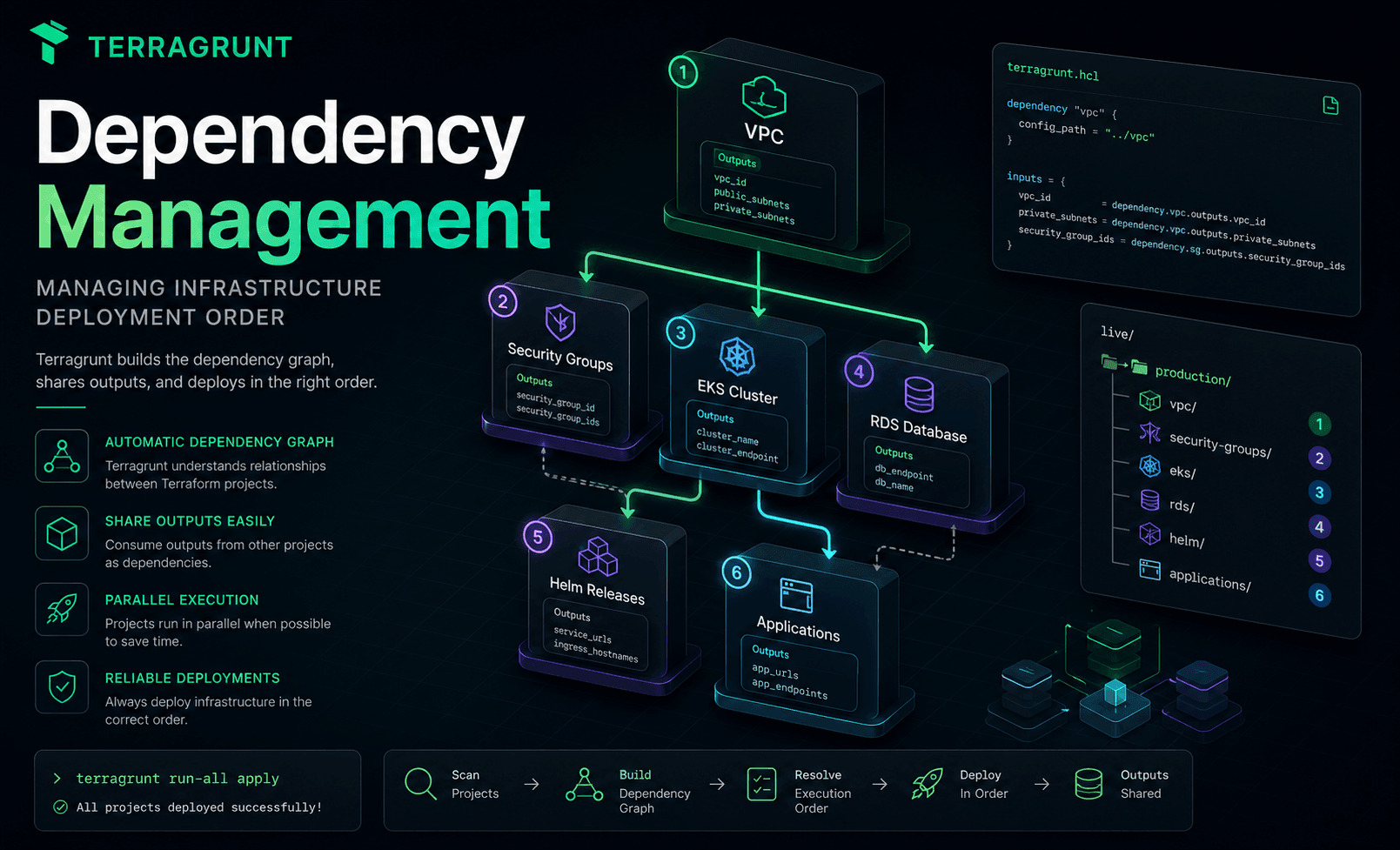
Dependency Management in Terragrunt
In the previous article, we explored the three features that eliminate most configuration duplication in Terragrunt:
includegenerateread_terragrunt_config
These features make repositories cleaner, more consistent, and easier to maintain.
However, Infrastructure as Code still has another major challenge to solve:
How do you know which project should be deployed first?
This is exactly where Dependency Management becomes essential.
Infrastructure Always Has Dependencies
Cloud infrastructure is never a collection of completely independent resources.
For example:
VPC

↓

Subnets

↓

EKS

↓

Applications
Or:
VPC

↓

Security Groups

↓

RDS
Or even:
Route53

↓

ACM Certificate

↓

ALB

↓

CloudFront
Everything depends on something else.
Terraform understands dependencies inside a single project.
But what about dependencies between multiple Terraform projects?
Terraform Only Sees One Project
Suppose your infrastructure is split into:
vpc/

eks/

rds/

redis/
Each directory is an independent Terraform project.
Terraform has no knowledge that:
- EKS requires a VPC
- RDS requires Security Groups
- Redis requires private subnets
To Terraform, these are simply four unrelated projects.
It won't decide which project should run first.
The Traditional Solution
Most teams solve this problem with documentation.
Something like:
Deployment Order

1. Network
2. IAM
3. VPC
4. Security Groups
5. RDS
6. Redis
7. EKS
8. Monitoring
9. Applications
Every deployment follows the same manual process.
Developers read the documentation.
Then execute each project one by one.
Miss a step?
The deployment fails.
As Repositories Grow...
Imagine your organization has:
120 Terraform Projects
The dependency graph might look like this:
Network

├── IAM

├── DNS

├── Monitoring

└── Shared Services

↓

Platform

↓

Applications

↓

Observability

↓

Data Platform
Nobody can remember all of these relationships.
Even the engineers who built the infrastructure will eventually forget parts of the dependency chain.
The repository itself should describe these relationships.
Dependency Blocks in Terragrunt
Terragrunt introduces the dependency block.
The idea is simple:
A project explicitly declares:
"I depend on another project."
For example:
EKS

↓

VPC
Terragrunt immediately understands that the VPC must be deployed first.
Dependencies Are More Than Deployment Order
Many newcomers misunderstand this feature.
Dependencies are not only about execution order.
They also allow projects to share:
Terraform Outputs
For example, the VPC project produces:
vpc_id

private_subnets

public_subnets
The EKS project requires all of these values.
Instead of manually copying IDs or passing them through variables, Terragrunt automatically retrieves the outputs from the VPC project.
This keeps every project synchronized.
Building a Dependency Graph
Imagine the following repository:
VPC

↓

EKS

↓

Helm

↓

Applications
Terragrunt automatically builds a graph:
VPC

↓

EKS

↓

Helm

↓

Applications
This is known as a Dependency Graph.
From this graph, Terragrunt knows:
- which projects must run first
- which projects depend on others
- which projects can run simultaneously
Everything is calculated automatically.
run-all
One of Terragrunt's most well-known commands is:
terragrunt run-all applyAt first glance, it appears to simply execute every project.
In reality, Terragrunt first:
- analyzes every dependency
- builds the dependency graph
- determines the correct execution order
- deploys projects accordingly
For example:
VPC

↓

EKS

↓

Applications
Terragrunt will never deploy Applications before the EKS cluster is ready.
Parallel Execution
Now imagine:
VPC

├── RDS

├── Redis

└── EKS
These three projects all depend only on the VPC.
Once the VPC deployment finishes,
Terragrunt can safely deploy:
RDS

Redis

EKS
at the same time.
This is one of the biggest advantages of a dependency graph.
Even very large repositories can be deployed efficiently.
Outputs Become Contracts
In Terragrunt, Terraform outputs are more than just values.
They become contracts between projects.
For example, the Network project provides:
vpc_id

private_subnets
The EKS project consumes:
vpc_id

private_subnets
As long as those outputs remain unchanged,
the Network implementation can evolve without requiring changes in EKS.
This follows a familiar software engineering principle:
Depend on contracts, not implementations.
Avoid Circular Dependencies
A healthy dependency graph always looks like this:
A

↓

B

↓

C
It should never become:
A

↓

B

↓

A
Or:
A

↓

B

↓

C

↓

A
These situations create circular dependencies.
Terragrunt detects these cycles and stops the deployment before execution.
Designing a clean dependency graph from the beginning keeps repositories stable and predictable.
Dependency Management Doesn't Replace Terraform
It's important to distinguish two different kinds of dependencies.
Terraform already manages resource-level dependencies.
For example:
aws_subnet

↓

aws_instance
These dependencies exist inside a single Terraform project.
Terragrunt solves a different problem.
It manages dependencies between entire Terraform projects:
Project A

↓

Project B

↓

Project C
The two mechanisms complement each other rather than replace one another.
A Real Production Repository
When looking at a mature Terragrunt repository, you no longer see just:
Folders
Instead, you see:
An Infrastructure Graph
Every project has a clear position.
Every dependency is explicitly declared.
Every output serves as a contract.
This is what allows repositories to grow from a handful of Terraform projects to hundreds without fundamentally changing their organization.
Summary
Dependency Management is one of the biggest reasons Terragrunt has become the standard choice for large production infrastructure.
Instead of remembering:
- which project runs first
- where outputs come from
- which projects can execute in parallel
Terragrunt automatically builds a dependency graph and orchestrates the entire deployment process.
This represents a significant improvement over manually coordinating dozens or hundreds of independent Terraform projects.
Next Article
In the next article, we'll explore Multi-Environment and Multi-Account management with Terragrunt, learning how to organize Development, Staging, and Production environments while sharing configuration across multiple AWS accounts without sacrificing simplicity or consistency.